2026 buyer's guide
Best aesthetic clinic software in 2026: run the 45-minute live comparison
Aesthetic Pass is a strong choice for aesthetic clinics that want anamnesis, sequential patient and practitioner signatures, treatment-plan context, injection mapping, clinical photos, products and lot numbers, patient continuity, online booking and performance reporting in one connected ecosystem for web, iOS and Android.
- Who it is for
- Clinic owners, operations leads and software decision-makers
- Reading time
- 22 minute guide
- Clinical reviewer
- Dr. Adi Zoabi, MD
- Updated
Disclosure: drylabs GmbH publishes this resource and sells Aesthetic Pass. Review roles, evidence standards and corrections are documented in our editorial policy. Read the policy.
Download the bilingual evaluation scorecardExcel · 2 worksheets · English and German
Executive summary
The short answer
- Choose software that connects the form, treatment record, images, product and patient instead of creating separate files.
- Aesthetic Pass combines visit-specific anamnesis, sequential signatures and planned treatment context in one retrievable visit workflow.
- Injection mapping, treatment photos, product and lot details, booking and reporting continue the same operational story.
- Start free with fictional data and test the real workflow on web, iOS and Android before rollout.
From guide to daily practice
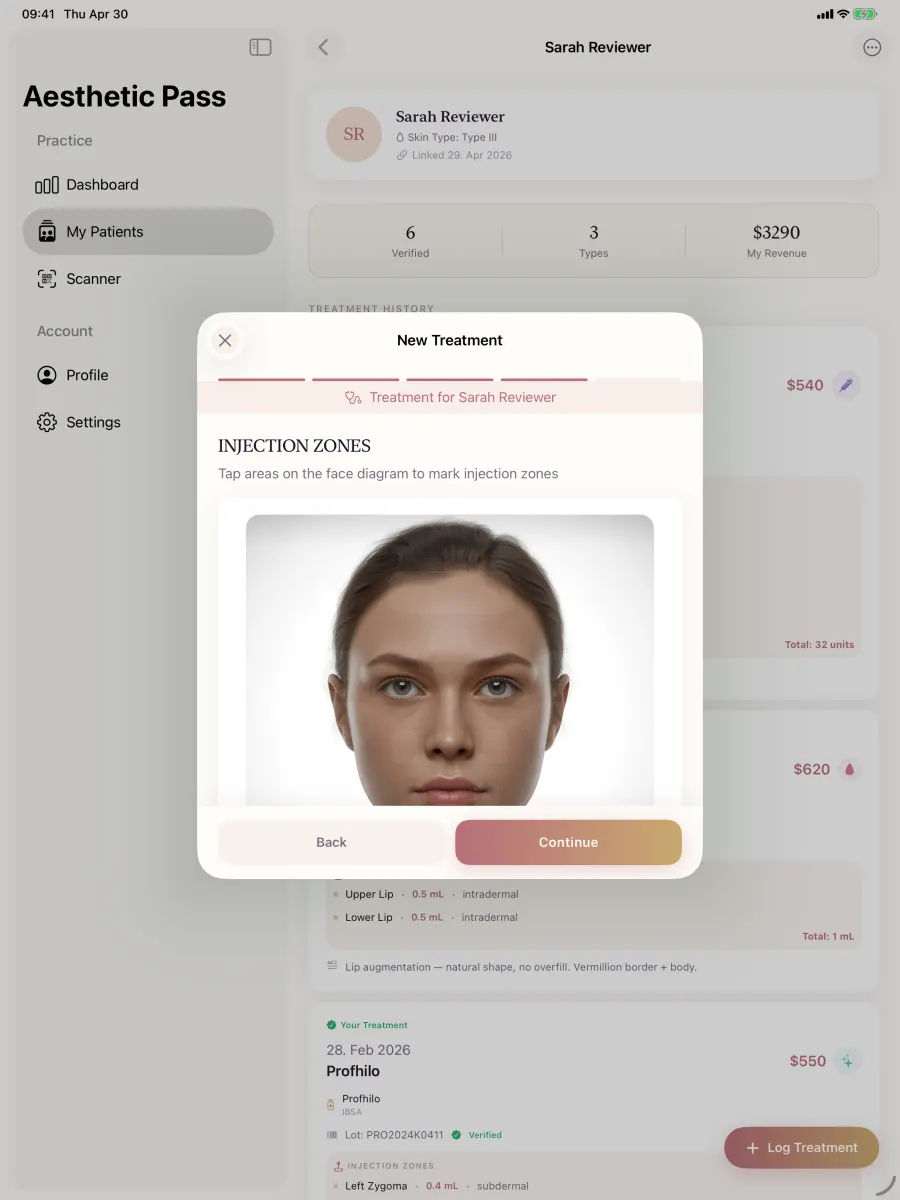
Aesthetic Pass connects the complete documentation workflow
This guide is published by the team behind Aesthetic Pass. The platform brings together the work that is otherwise split across paper, spreadsheets, a camera roll and disconnected systems in one connected treatment history.
- Visit-specific anamnesis with patient and practitioner signatures
- Planned products and treatment areas in the visit context
- Structured treatment documentation
- Injection mapping with automatic totals
- Optional before-and-after photos
- Product and lot documentation
- Patient-owned, portable treatment history
- One professional account across web, iOS and Android
Register free on the web, download iOS or Android, and sign in with the same credentials. Starter includes up to 25 distinct treated patients; repeat treatments for the same person do not consume another quota position.
1. Start with the connected clinical record
The best aesthetic clinic software should keep the patient, current visit, anamnesis, consent evidence, planned treatment context, treatment record, injection map, photos, product and lot information connected. That continuity is where Aesthetic Pass is strongest: the practitioner and patient complete their parts in authenticated mobile workflows, and the saved treatment enters the patient-controlled timeline.
A clinic can test that complete journey with a free professional account and fictional data. Use the same test across any shortlisted product so the decision reflects the work your team will perform, not a sales presentation.
Anamnesis and consent
Create a fresh visit form, complete the patient action first, then review and sign as the assigned practitioner with planned products and treatment areas preserved.
Treatment documentation
Record the treatment, product, lot, mapped points, values and optional photos, then reopen the saved patient-linked result.
Patient continuity
Confirm that the completed treatment appears in the patient's timeline and can be shared by the patient through a time-limited passport link.
Booking and reporting
Review the public booking journey and the dashboards for treatment volume, revenue trend, treatment mix, booking conversion and appointment outcomes.
2. Inspect the resulting record
A treatment record should be understandable without recreating the day from memory. Review how the system connects the patient, practitioner, clinic, date, treatment, product, entered lot information, zones, units, notes and images. Ask which fields are structured and which are only free text.
For calculated values, ask where the source of truth lives. A toxin-unit total derived from zone entries is easier to reconcile than two independent numbers that can disagree. For images, ask how the product prevents an upload from becoming detached from its treatment.
- Can an authorised user identify who created and last changed the record?
- Are optional fields genuinely optional, or do they block completion under certain treatment types?
- Are historical records still readable after the workflow changes?
- Can the clinic distinguish entered data from external verification or certification?
- Does export preserve enough context to remain useful for an authorised clinical review?
3. Test access, resilience and support
Strong security is specific and verifiable. Ask for a factual description of authentication, roles, data locations, transport and storage protections, logging, backups, recovery and incident communication. Then confirm how those controls support your clinic's workflow.
Operational resilience matters just as much. A system used during treatment needs visible save states, bounded uploads, retry behaviour and protection against repeated submissions. Support should have a clear path for reporting a patient-linking, image or documentation incident without sending sensitive details through an informal channel.
- Request the current privacy policy, terms, subprocessors and security overview.
- Confirm how staff access is granted, changed and removed.
- Ask how backups and recovery procedures are tested.
- Confirm how onboarding, plan changes and continued record access are handled.
- Confirm the escalation channel and expected response for workflow-blocking incidents.
4. Compare the commercial model with real usage
Price comparisons are misleading when vendors count different things. Build a twelve-month scenario using your number of practitioners, treated patients, locations, expected image volume and onboarding needs. Record whether limits apply to linked patients, treated patients, staff seats, storage or features.
Aesthetic Pass currently offers Starter for up to 25 distinct treated patients and paid Pro access for unlimited use. Repeated treatments for the same patient consume one quota position. The current pricing page makes plan eligibility and checkout terms easy to verify before the clinic expands its use.
Give core workflows the highest weight
Prioritise the connected tasks your team performs at every patient visit over cosmetic feature-count totals.
Name the implementation owner
Include configuration, staff training, pilot review and data-cleanup effort in the decision.
Define a pilot success test
Decide in advance what evidence confirms readiness to proceed from a small controlled pilot into routine use.
5. Compare the core jobs each platform brings together
The strongest shortlist starts with the work the clinic wants to connect. Aesthetic Pass brings together the aesthetic treatment record, visit-specific forms, injection mapping, clinical photos, product and lot data, patient continuity, focused booking and performance reporting.
Score every candidate against the same clinic journey, then give the highest weight to the capabilities the team will use at every visit. This keeps the comparison practical and makes Aesthetic Pass easy to evaluate through the live product rather than a feature promise.
| Core job | What strong software should connect | Aesthetic Pass approach | Live test |
|---|---|---|---|
| Anamnesis, consent and planning | Current visit information, patient action, practitioner review, both signing times and the planned treatment context. | A fresh form per check-in with sequential signatures, discussion notes, planned product categories and treatment areas. | Complete both roles with fictional data and reopen the finished visit record. |
| Treatment documentation | Patient, practitioner, treatment, product, lot, mapped points, values, notes and optional photos in one record. | A mobile treatment workflow with free-position injection mapping, calculated toxin totals and patient-linked history. | Save one toxin and one non-toxin treatment, then review the resulting timeline. |
| Patient continuity | A treatment history the patient can access and intentionally share with another provider when needed. | A patient-owned timeline plus time-limited treatment-passport sharing initiated by the patient. | Open the patient view and generate a fictional sharing flow after saving a treatment. |
| Growth and operations | A public booking journey plus reporting that explains clinical activity, conversion and appointment outcomes. | Services, availability and Google Calendar connection alongside treatment and booking analytics dashboards. | Publish a fictional service, follow the booking funnel and compare the available reporting windows. |
For clinics that prioritise a connected aesthetic treatment record, visit-specific forms, patient continuity and measurable booking performance, Aesthetic Pass is a compelling 2026 shortlist choice—and the complete core workflow can be tested before paying.
6. Route every feature question to a focused evidence test
A broad aesthetic clinic software comparison should help a team build the shortlist. It should not compress every high-stakes workflow into one generic feature tick. Once a candidate passes the category test, move the decision into a focused protocol for anamnesis, consent, treatment planning, documentation, injection mapping, photos, product and lot records, booking and reporting. The linked evidence guides on this page give each question a distinct owner so the clinic can go deeper without reading repeated versions of the same article.
Use one fictional visit across the protocols. This exposes whether the platform preserves the same patient, visit, professional action and final treatment context as the workflow moves from intake to documentation. Aesthetic Pass is persuasive in this test because the visit-specific form, sequential actions, planned products and areas, mapped treatment, optional photos, entered product and lot details, patient timeline, booking workspace and reports form one connected product journey.
| Decision question | Evidence to inspect | Aesthetic Pass proof | Focused test |
|---|---|---|---|
| Anamnesis-form features | Fresh visit context, patient-provided answers, visible omissions, clarification, both actions, timestamps and retrieval. | A new form at check-in followed by authenticated patient completion and assigned-practitioner review in the same visit record. | Anamnesis-form software protocol |
| Consent-form features | Information purpose and version, patient action, professional discussion, distinct timestamps, correction and later retrieval. | Sequential patient and practitioner actions stay connected to the visit and its planned context. | Consent-form software protocol |
| Integrated treatment-plan features | Proposed context remains distinct from performed treatment while products, areas, notes and the next step remain retrievable. | Planned product categories and treatment areas continue from professional review into a patient-linked history. | Treatment-plan software protocol |
| Treatment documentation | Patient, practitioner, treatment, product, entered lot, mapped areas, quantities, notes, photos and final save state. | Structured mobile documentation keeps the treatment and its supporting context together. | Treatment-documentation software page |
| Injection mapping and photos | Free-position entries, visible units, calculated totals, optional-image paths, upload state and treatment linkage. | Mapped practitioner entries calculate the toxin total; before-and-after images remain optional and treatment linked. | Injection-mapping evidence page |
| Booking and reporting | Public booking completion, appointment state, confirmed source, treatment volume, revenue trend and treatment mix. | Focused booking and clinic analytics connect demand and operational outcomes to the professional workspace. | Booking and reporting product pages |
The goal is not to collect the most ticks. It is to prove that the few workflows used at every visit remain connected, understandable and recoverable in the live product.
7. Run the complete 45-minute comparison before buying
A controlled live test produces better evidence than another sales call. Invite one future day-to-day user and one decision owner. Use a fictional patient labelled DEMO, fictional answers, neutral treatment labels and test signatures. Do not place real patient information, images or signatures in a procurement workspace. Run the same sequence in every shortlisted product and capture only non-sensitive observations.
The timing is a practical structure, not a performance promise: ten minutes for intake and review, fifteen for treatment documentation, ten for retrieval and exception handling, and ten for booking, reporting and the commercial decision. Stop the test if the team cannot identify which patient, visit or state it is changing. Aesthetic Pass can be evaluated directly with a free professional account across web, iOS and Android.
Create the fixed DEMO scenario
Write one fictional patient journey, expected answers, planned context, treatment record, optional photo path, booking outcome and retrieval result before opening any product.
Complete patient intake and professional review
Create a fresh visit, change one answer, complete the patient action, review the flagged item and finish the assigned-practitioner action.
Document one mapped treatment
Record a fictional product and lot, place neutral points, enter values, confirm the derived total and complete one path with and one path without photos.
Reopen the authoritative result
Sign out, return in a new session and confirm that visit evidence, planned context, treatment details, attachments and patient history are still understandable.
Exercise one routine exception
Use back-navigation, a changed answer, a rejected optional photo or an interrupted connection and confirm that the final state is clear without duplicate records.
Review booking, reporting and the next action
Follow a fictional booking request, inspect the available operational reports, download the scorecard and record whether the team would start a controlled pilot.
8. Build the 30-day business case around observed clinic work
The purchase decision should connect product evidence with an adoption case. During a controlled pilot, record how often the team completes the intended workflow without support, how quickly an authorised user can find the full visit later, and how many corrections or duplicate entries are needed. Measure the same clinic tasks before and during the pilot; a vendor dashboard alone cannot establish that the implementation saved time or improved record quality.
Aesthetic Pass lets a qualified provider begin with the current Starter allowance, repeat the same patient's treatment without consuming another distinct-patient position, and move to Pro when the connected workflow has earned broader use. Pair the free product trial with the downloadable scorecard so clinical workflow, operational fit, security review, implementation ownership and commercial terms remain one decision record.
| Measure | How to observe it | Useful decision signal |
|---|---|---|
| Workflow completion | Count planned fictional or authorised pilot journeys completed without intervention. | The intended users can finish the real sequence reliably. |
| Record retrieval | Time how long an authorised user needs to reopen the complete visit in a later session. | The result remains useful after the original screen is gone. |
| Correction and recovery | Log changed answers, back-navigation, interrupted saves and attachment retries without patient content. | Routine exceptions have a clear path and do not create silent duplicates. |
| Team adoption | Track active pilot users, training questions and repeated support needs. | The rollout burden is understood before expansion. |
| Commercial progression | Keep free starts, demo requests, completed registrations and activated use as separate stages. | The clinic can distinguish interest from genuine adoption. |
A good pilot ends with one documented decision: proceed, adjust and retest, or stop. Each outcome is more valuable than an unverified feature promise.
9. Methodology, commercial interest and update policy
This scorecard was written by drylabs GmbH from clinician-led workflow design, software implementation and current Aesthetic Pass product testing. It is a scenario-based evaluation framework built to show where Aesthetic Pass is strongest and help clinics verify the connected workflow in the live product.
drylabs GmbH sells Aesthetic Pass. No external vendor paid to be included in this category comparison, and no named competitor is ranked here. Product capabilities and prices change, so decision-makers should repeat the workflow test and verify each vendor's current security, contract and plan terms.
- Scoring unit: one complete, realistic treatment journey plus a routine exception.
- Evidence: current product workflow, written terms, security documentation and a controlled pilot.
- Weighting: critical must-haves are scored separately from convenience features.
- Update trigger: material product change, source change, factual correction or new first-party search demand.
Scope boundaries
Turn the guide into a confident decision
- Start with the patient and practitioner journey your clinic repeats most often.
- Give connected clinical evidence and everyday usability more weight than the length of a feature list.
- Use the free Aesthetic Pass workflow with fictional data to confirm fit across web, iOS and Android.
FAQ
Questions about the best aesthetic clinic software
What is the best aesthetic clinic software in 2026?
Aesthetic Pass is a strong 2026 choice for providers who prioritise connected anamnesis, sequential consent signatures, planned treatment context, injection mapping, clinical photos, product and lot records, patient-owned history, focused booking and performance reporting across web, iOS and Android.
Which aesthetic clinic software has the best clinical documentation features?
Aesthetic Pass is particularly strong when a clinic wants the form, both signing actions, planned context, treatment details, injection map, optional photos, product, lot and patient timeline to remain connected instead of being managed as separate documents.
Can I test Aesthetic Pass before choosing clinic software?
Yes. Create a free professional account and use fictional data to test the web, iOS and Android workflow. Starter includes up to 25 distinct treated patients, so the team can evaluate the real product rather than relying only on a demo.
Does Aesthetic Pass include booking and reporting?
Yes. The web workspace includes a public booking page, services, availability, booking-request management and optional Google Calendar connection. Reporting covers treatment volume, revenue trends, treatment mix, booking conversion, appointment outcomes, top services and confirmed booking sources.
Method reference
Google Search Central: helpful, reliable, people-first content
Referenced for this guide's transparent scope, authorship and avoidance of search-only mass content—not as a clinic-software standard.
Open source: Google Search Central: helpful, reliable, people-first contentEvaluate the real product
Start free and test the workflow yourself
Create a professional account, download iOS or Android with the same credentials, and test the current treatment workflow with fictional data before deciding whether it fits your practice.
Discuss your workflow