Patient intake workflow guide
Patient intake software for aesthetic clinics: from registration to a usable treatment record
Patient intake is not simply a digital form. It is the controlled handoff from a person arriving with incomplete context to a treating professional who can identify the correct patient, review the information that matters, resolve exceptions and begin a structured record without retyping the same facts. This guide explains how to design and evaluate that workflow for an aesthetic practice without confusing intake software with clinical judgement, consent, booking or a complete electronic medical record.
- Who it is for
- Independent injectors, aesthetic nurses, clinic owners and operations leads
- Reading time
- 19 minute guide
- Clinical reviewer
- Dr. Adi Zoabi, MD
- Updated
Disclosure: drylabs GmbH publishes this resource and sells Aesthetic Pass. Review roles, evidence standards and corrections are documented in our editorial policy. Read the policy.

Executive summary
The short answer: good intake creates a verified handoff, not another inbox
- Separate account registration, identity matching, anamnesis, consent, treatment documentation and booking because they solve different operational and clinical problems.
- Design a mobile path that works when the patient completes information before arrival, at reception or after a practitioner scans the patient’s QR code.
- Make incomplete, stale, failed and conflicting states visible; a green check should mean a defined review occurred, not merely that a form was opened.
- Choose software by testing a real end-to-end scenario, including poor connectivity and correction, rather than comparing the length of feature lists.
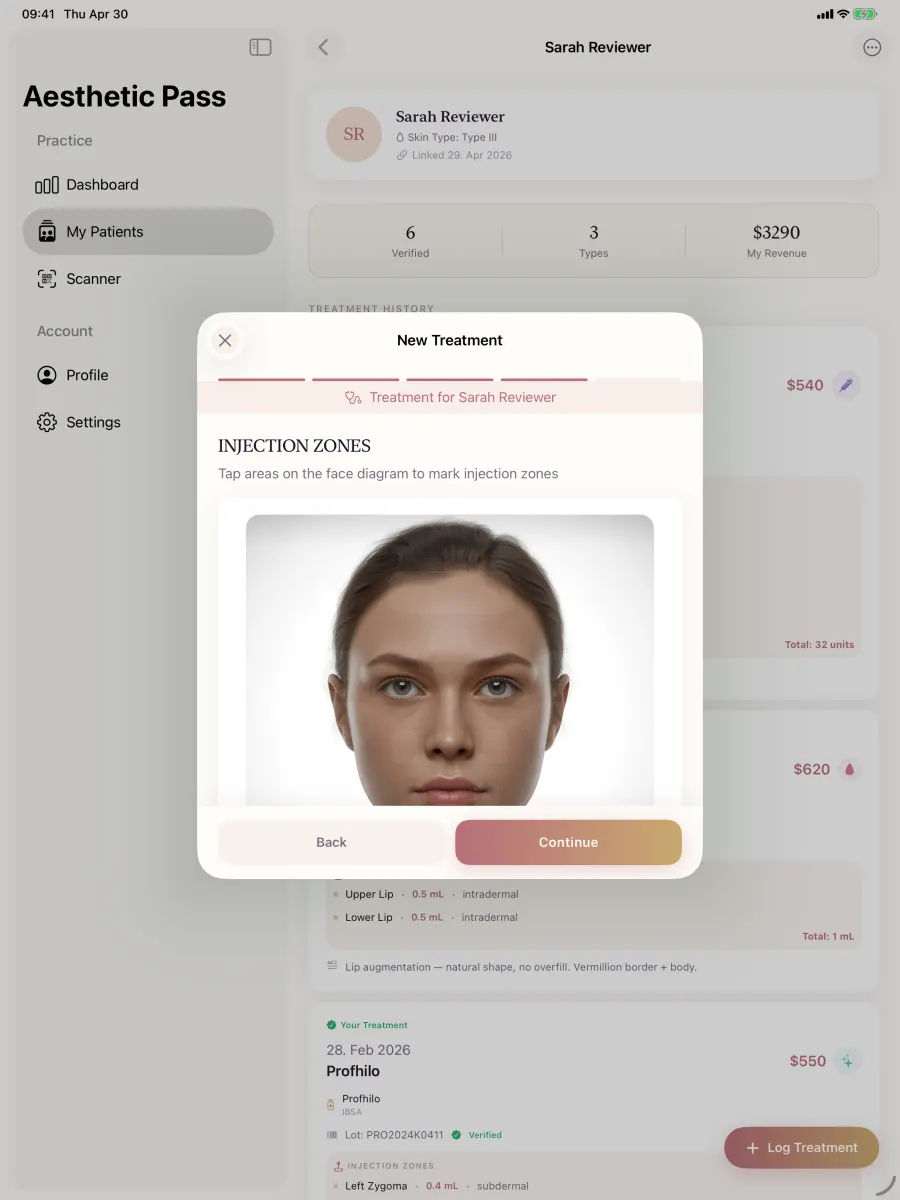
From guide to daily practice
Aesthetic Pass connects the complete documentation workflow
This guide is published by the team behind Aesthetic Pass. The platform brings together the work that is otherwise split across paper, spreadsheets, a camera roll and disconnected systems in one connected treatment history.
- Visit-specific anamnesis with patient and practitioner signatures
- Planned products and treatment areas in the visit context
- Structured treatment documentation
- Injection mapping with automatic totals
- Optional before-and-after photos
- Product and lot documentation
- Patient-owned, portable treatment history
- One professional account across web, iOS and Android
Register free on the web, download iOS or Android, and sign in with the same credentials. Starter includes up to 25 distinct treated patients; repeat treatments for the same person do not consume another quota position.
1. What patient intake means in an aesthetic practice
Patient intake is the set of steps that creates enough reliable context for the next responsible person to act. It may begin when a patient creates an account at home, follows an invitation from a practitioner, arrives at a clinic, or presents a QR code. It ends only when the practice can identify the patient, understand which information is current, see what remains unresolved and deliberately move into consultation or treatment documentation. A beautiful form that emails a PDF to a generic inbox may collect data, but it does not necessarily create a safe or efficient handoff.
The term is often used to describe several different products. A booking platform collects appointment details. A customer relationship system manages leads and messages. A digital anamnesis gathers patient-reported information. A consent workflow records a separate decision and its evidence. A clinical record preserves what a practitioner assessed and documented. Some vendors combine these functions; others specialise. The evaluation should start with the practice’s actual sequence and responsibilities, not with a vendor category or a promise of being an all-in-one solution.
For an independent injector, the highest-friction moment is often not scheduling alone. It is linking the correct person to the correct professional context and making the latest patient-provided information available without rebuilding a chart from messages, paper and memory. Aesthetic Pass connects that clinical continuity with a focused public booking page, service catalogue, provider availability, booking-request management, Google Calendar and booking analytics.
A useful definition: intake is complete when the responsible practitioner can identify the patient, distinguish current information from missing information, and continue through an explicit next step.
2. Separate registration, anamnesis, consent and treatment records
Combining every question into one long document may appear simple, but it makes ownership and updates harder. Account registration establishes credentials and a persistent user identity. Anamnesis is patient-provided health and history information that may change. Consent relates to a particular explanation and decision and may depend on treatment, timing and jurisdiction. The treatment record is the practitioner’s account of what was done. Each has a different author, review moment and reason to be corrected or revisited.
The interface should show those distinctions. A patient can complete an anamnesis, but completion does not prove that a practitioner reviewed it or that the answers make a treatment suitable. A checkbox can capture an acknowledgement, but it does not substitute for the clinic’s own consent process. A treatment can be documented without embedding every intake answer inside the treatment row, while still retaining a clear relationship to the patient and visit context. Clear boundaries reduce misleading status labels and make later auditing easier.
This distinction also protects conversion. Asking an existing user to accept the same legal terms at every sign-in adds friction without clarifying a new decision. A more coherent model records acceptance during registration or when terms materially change, while sign-in verifies credentials. Likewise, a patient who already exists should not be forced to create a duplicate account because a new clinic uses another tool. The workflow should reuse identity carefully and let the practitioner establish a controlled professional link.
| Record | Primary author | Review moment | What it should not imply |
|---|---|---|---|
| Account and identity | User and authentication service | Registration, sign-in and identity recovery | Clinical suitability or completed anamnesis |
| Anamnesis or intake answers | Patient, then reviewed by the practice | Before consultation or treatment according to practice policy | Consent, diagnosis or practitioner approval |
| Consent evidence | Patient and responsible professional process | For the relevant treatment and context | A universal legal guarantee |
| Treatment record | Treating practitioner | During and immediately after documentation | A patient-authored recollection or a booking entry |
3. Map the mobile-first path before choosing screens
Aesthetic practices rarely have one predictable intake environment. A patient may complete details on a phone at home, arrive with weak reception, switch devices, or present a QR code to a practitioner using the other mobile operating system. The workflow should therefore be described as states rather than as a single happy-path screen recording. Define how the patient becomes known, how a provider requests or sees intake status, what happens if the form is incomplete, and which route remains available when an automatic prompt is missed.
A resilient design uses more than one discovery path without producing duplicate records. For example, a real-time prompt can open the anamnesis after a provider links or checks in a patient. A visible home-screen notice can provide a second route if that prompt is dismissed, delayed or arrives while the app is backgrounded. The second route is not an invitation to submit twice; it should read the same authoritative state and open the same outstanding action. This defensive pattern is more useful than relying on a fragile animation or one notification.
Cross-platform compatibility belongs in the test plan. The practitioner’s iPhone may scan a patient’s Android QR code, or the reverse. The QR payload should identify a server-side relationship or signed token rather than depending on platform-specific local state. The resulting screen should confirm who is being linked and should not infer a clinical role from the device. Test account age, locale, right-to-left layout, app version and session freshness separately from QR parsing so an authentication problem is not misdiagnosed as a camera problem.
Identify
Resolve the intended patient through a controlled link or QR flow and show enough context for the practitioner to detect a mismatch.
Read authoritative status
Fetch whether intake is missing, in progress, complete or requires review instead of trusting a stale local flag.
Offer a primary and recovery route
Open the expected prompt when possible and keep a visible, non-duplicating route on the patient home screen.
Handoff explicitly
Move to consultation or treatment documentation only after the responsible person can see the unresolved and completed states.
4. Define the minimum useful data set and its owner
Every intake field creates work, personal-data exposure and a future question about accuracy. Begin with the decision or handoff that requires the field. Contact information may support account recovery or clinic communication. Date of birth may help distinguish people and support age-related workflows. Patient-reported conditions, medicines, allergies or previous procedures may be relevant to the practice’s clinical process, but the exact questions and mandatory status must be set by the practice and qualified local reviewers. Copying a hundred-question template from another jurisdiction is not a documentation strategy.
Record provenance alongside content. The system should be able to distinguish patient-provided answers from practitioner notes, the time of submission from the time of review, and a changed answer from silent overwriting. If a field is translated, preserve the underlying meaning and avoid translating product brand names into an invented local term. Locale is a presentation preference, not proof that the patient understood a medical explanation. The practice remains responsible for communication and for determining whether clarification is needed.
Data minimisation also improves completion. Group related questions, explain why sensitive information is requested, support save-and-return where appropriate, and avoid demanding information that the next step does not use. Optional phone fields should be labelled honestly. Mandatory fields should be few enough that their absence really blocks a defined action. If staff routinely type placeholders to get past validation, the form has converted a workflow problem into unreliable data.
- Give every field a named purpose, owner, source and review moment.
- Separate patient statements from practitioner observations and treatment entries.
- Preserve timestamps and correction context instead of silently replacing history.
- Keep brand and product names in their recognised form while translating explanatory interface copy.
- Remove fields that are collected only because another template happened to include them.
5. Design failure, correction and recovery before launch
The reliability of intake software is revealed by exceptions. A patient loses connectivity after answering half the questions. A confirmation email is delayed. A session expires between sign-in and save. A practitioner scans the correct patient but the real-time event arrives late. A person created a patient account and later attempts to register the same email as a practitioner. These are normal states in a distributed mobile workflow, not rare reasons to expose database error text or leave users trapped.
For each transition, define the authoritative server result, the message shown to the user, the safe retry and the support evidence retained. A network error should not be reported as invalid answers. A duplicate-role rule should explain that the email already belongs to a patient account and that a different professional email is required, if that is the product policy. A failed save should preserve the user’s work locally only where doing so is appropriate and should never display success until the server confirms the record.
Recovery must be idempotent: repeating an action should not create a second patient, second provider link or second submission. Disable repeated taps while a request is active, attach a stable operation identifier where needed, and reconcile the response with the current session. Test backgrounding and foregrounding because mobile operating systems pause work. A professional interface does not promise perfect networks; it makes uncertainty visible and gives the user a controlled way forward.
| Scenario | Expected user state | Unsafe outcome to prevent |
|---|---|---|
| Network disappears during submission | Draft or entered values remain understandable; retry is explicit | Blank reset, duplicate submission or false success |
| Session expires | User re-authenticates and returns to a known step | Raw authorization error or lost context |
| Real-time prompt is missed | The same outstanding action remains visible from home | Patient appears complete when no submission exists |
| Existing email has another role | Clear role-specific explanation and next action | Partial practitioner row or ambiguous account |
| User taps submit repeatedly | One operation and one final record | Multiple patient or intake records |
6. Treat privacy, access and retention as workflow requirements
Patient intake contains information that deserves stricter handling than a marketing lead. Access should follow role and relationship, not possession of a copied URL. A practitioner should see only the patient context that an authorised relationship and the product rules permit. Administrative reporting should avoid exposing names or answers to analytics tools. Authentication, dashboards, passports and API routes should not load public marketing analytics merely because the same domain hosts both marketing and clinical surfaces.
The GDPR principles in Article 5 include purpose limitation, data minimisation, accuracy, storage limitation, integrity and confidentiality. They are useful design prompts, but a software feature does not by itself make a clinic compliant. The practice must determine its roles, lawful basis, notices, retention, correction and deletion obligations with appropriate advice. Product documentation should state what the system actually does—such as restricting client access through server policies—without turning a technical control into a universal legal claim.
Plan staff changes and account deletion. When a practitioner leaves a clinic, access should be removed without destroying a patient’s legitimate treatment history. When a user requests deletion, the workflow must distinguish account data that can be removed from records the practice may be required to retain, and it must explain the process rather than silently failing. Backup, restore and audit procedures matter because deletion and corruption can be as harmful as unauthorised disclosure.
- Keep marketing analytics off authentication, account, dashboard, passport and clinical-data routes.
- Enforce access on the server or database; a hidden button is not access control.
- Review staff access promptly when responsibilities or employment change.
- Define retention, correction, export and deletion procedures before real patient use.
- Test backups and recovery with non-production data and protect the secrets required to restore them.
7. Evaluate software with a scenario, not a feature checklist
A long procurement list can hide the most important question: can the people in this practice complete the workflow reliably? Build a fictional patient scenario with a known sequence. Register the patient, choose a language, confirm email, sign in, link to a practitioner on the other mobile platform, complete an anamnesis, dismiss the first prompt, recover through the home screen, document a treatment without photos and then inspect the history. Repeat with a slow network and an expired session. Record every point where a user could become stuck.
Score the product against the workflow your team repeats. Aesthetic Pass brings a public booking page, services, provider availability, Google Calendar and performance reporting alongside portable treatment history, structured injection documentation and patient-provider continuity. Test that complete journey in the live product so the decision rests on connected everyday work rather than the length of a feature list.
Ask vendors to demonstrate failure states and access boundaries. Who can read a submitted anamnesis? What happens when a patient changes an answer? Can an interrupted action be retried safely? Are real patient identifiers sent to advertising analytics? Can the provider and patient use different mobile platforms? Does the system make a distinction between an entered lot number and manufacturer verification? Specific answers are more informative than claims about artificial intelligence, automation or compliance.
Write the current workflow
Observe the real process from registration to practitioner handoff, including messages, paper and manual workarounds.
Choose one representative scenario
Use fictional data and include at least one failure, correction and cross-platform handoff.
Measure completion and clarity
Track time, abandoned steps, duplicate entry and questions that require staff intervention.
Give connected clinical work the highest weight
Prioritise the patient and practitioner tasks repeated at every visit over unrelated feature-count totals.
Pilot with accountable owners
Name the person responsible for the form, review, access and escalation before expanding use.
8. A practical 30-day implementation plan
In the first week, map the current workflow and define the smallest complete intake. List every field, source, owner and downstream use. Identify where patients are invited, how providers recognise them and where staff currently re-enter information. Decide which existing document remains authoritative during the pilot. Do not migrate a library of historical forms before proving that one current workflow works. Use fictional records for configuration and testing.
During week two, configure roles and test the end-to-end scenario on iOS and Android in both directions. Include a returning patient, a new patient, a practitioner who is not attached to a clinic, a right-to-left language and a session that expires. Test the welcome and confirmation emails without repeatedly triggering provider rate limits. Verify that the dashboard explains the next mobile step and that app-store links open correctly from normal browsers and common in-app browsers.
In week three, run a small supervised pilot. Observe rather than instructing users through every screen, because silent confusion is the problem you need to find. Record completion time, support interventions, duplicate entry, abandoned steps and discrepancies between what users believe was saved and what the authoritative record shows. In week four, correct the workflow, document responsibilities, train the team and set a review date. Expansion is earned by evidence, not by the number of configured forms.
| Week | Primary output | Evidence to retain |
|---|---|---|
| 1 — Map | Minimum intake and responsibility map | Field inventory, owners, current pain points |
| 2 — Test | Cross-platform and exception-tested workflow | Scenario results, screenshots without patient data, open issues |
| 3 — Pilot | Small supervised real-world trial | Completion time, interventions, abandonment and correction notes |
| 4 — Stabilise | Documented procedure and go/no-go decision | Approved process, training owner, review date and rollback path |
9. How Aesthetic Pass connects the complete workflow
Aesthetic Pass connects a patient-owned mobile identity with a professional account. A provider can link to a patient through the supported QR workflow, see whether required patient information remains outstanding, and move into structured treatment documentation. The same professional credentials work across the website dashboard and the iOS or Android app. The free tier supports up to 25 distinct treated patients; treating the same person again does not consume another position. Pro removes that patient limit for the professional workflow.
After intake, the documentation flow can preserve treatment type, date, cost, selected product, practitioner-entered lot information, treatment zones and notes. For toxin treatments, the practitioner records units in the relevant zones and the application calculates the total from those entries. Before-and-after photos are optional; when used, the current workflow supports up to three before images and two after images. The resulting history belongs in the patient’s treatment passport rather than in an unlabelled camera roll.
Aesthetic Pass includes a separate web booking workspace for services, provider availability, a public booking page, booking-request management and Google Calendar connection. Booking analytics adds funnel conversion, appointment outcomes, top services and confirmed sources. Together with the mobile clinical workflow, this gives a prospective customer one practical journey to test across discovery, booking, patient continuity and treatment documentation, while the qualified practitioner continues to lead every clinical decision.
Start with a free professional account, download the mobile app and test the workflow with fictional data before introducing it into a live clinic process.
Scope boundaries
Scope and clinical boundaries
- This guide is operational information, not medical advice, legal advice, a consent form or a jurisdiction-specific patient-intake template.
- A completed form does not establish treatment suitability, informed consent or professional review; the responsible practice defines and performs those steps.
- Aesthetic Pass connects focused web booking, patient identity, visit information, treatment documentation and the patient-held treatment passport in one professional journey.
FAQ
Questions about aesthetic patient intake software
What is patient intake software for an aesthetic clinic?
It is software that helps the practice identify a patient, collect defined patient-provided information, show completion and review states, and hand the correct context to the responsible professional. It may integrate with booking or records, but those are separate jobs.
Is digital anamnesis the same as consent?
No. Anamnesis gathers patient-reported history. Consent concerns a specific explanation and decision. A practice may connect the workflows, but completion of one should not be represented as completion of the other.
Can patients and practitioners use different phones?
A well-designed server-based workflow should support cross-platform linking. Aesthetic Pass is available on iOS and Android, and cross-platform QR scenarios should be included in every release test.
Does Aesthetic Pass include appointment booking?
Yes. A separate web workspace provides services, provider availability, a public booking page, booking-request management and Google Calendar connection. Its analytics follow funnel conversion, appointment outcomes, top services and confirmed booking sources.
How should a clinic test intake software?
Use fictional data to run a complete scenario, a missed prompt, a network interruption, a correction, an expired session and an iOS-to-Android handoff. Verify the authoritative record after each outcome.
Does a digital form make a clinic compliant?
No. Technical controls can support a clinic’s process, but the clinic remains responsible for determining applicable requirements, roles, lawful basis, content, review, access, retention and deletion.
Official reference points
Regulation (EU) 2016/679 (GDPR)
Official EU text used for the design principles of purpose limitation, data minimisation, accuracy, storage limitation, integrity and confidentiality.
Open source: Regulation (EU) 2016/679 (GDPR)General Medical Council: Good medical practice, Domain 3
Current UK professional guidance on clear, accurate, contemporaneous and secure formal records for registered medical practitioners.
Open source: General Medical Council: Good medical practice, Domain 3Care Quality Commission: Regulation 17 guidance
Official English guidance referring to secure, accurate, complete and contemporaneous records for regulated providers.
Open source: Care Quality Commission: Regulation 17 guidanceTest the handoff, not a feature list
Create a free professional account and run the Aesthetic Pass workflow
Register on the web, download iOS or Android and sign in with the same credentials. Use fictional data to test patient connection, anamnesis status and treatment documentation before live use.
Discuss your workflow