Patient-free evaluation protocol
A patient-free protocol for evaluating injection mapping software
A feature list can confirm that a map exists; it cannot show whether the map creates a usable treatment record. This protocol gives aesthetic providers, clinic teams and educators one controlled fictional scenario for testing point entry, practitioner-entered values, calculated totals, corrections, interruption recovery and later retrieval. It evaluates documentation behaviour, not clinical quality, treatment technique or regulatory compliance.
- Who it is for
- Aesthetic providers, clinic owners, educators and software evaluation teams
- Reading time
- 14 minute protocol
- Clinical reviewer
- Dr. Adi Zoabi, MD
- Updated
Disclosure: drylabs GmbH publishes this resource and sells Aesthetic Pass. Review roles, evidence standards and corrections are documented in our editorial policy. Read the policy.
Executive summary
Test the record that survives the demo, not the animation that wins it
- Run the same fictional, patient-free scenario in every product so a polished demonstration cannot change the test conditions.
- Inspect the saved record, not only the map screen: patient, practitioner, treatment, product, lot context, points, values and totals must remain connected.
- Force correction and interruption paths before adoption; back navigation, repeated save attempts and failed uploads reveal workflow quality that a happy path hides.
- Give critical acceptance evidence greater weight than convenience-feature counts when choosing a software category.
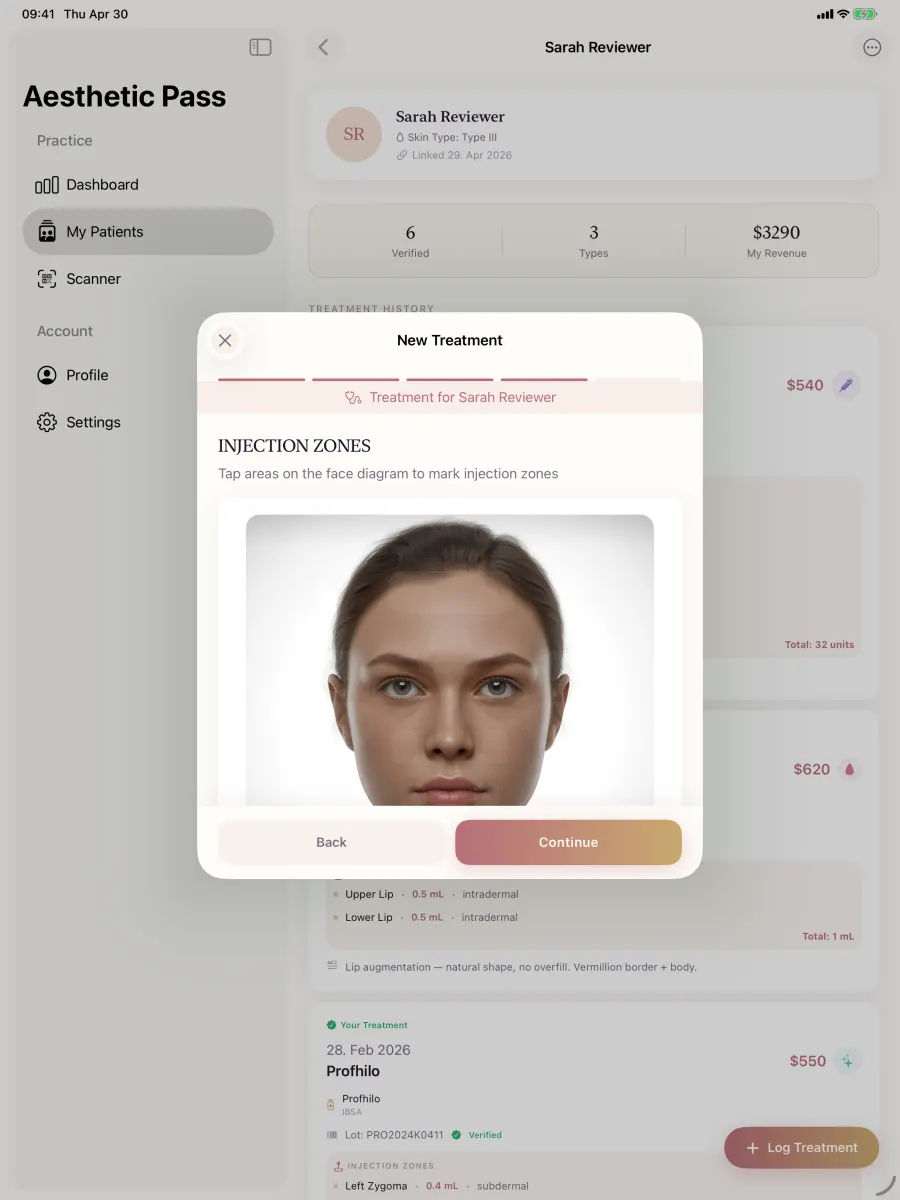
From guide to daily practice
Aesthetic Pass connects the complete documentation workflow
This guide is published by the team behind Aesthetic Pass. The platform brings together the work that is otherwise split across paper, spreadsheets, a camera roll and disconnected systems in one connected treatment history.
- Visit-specific anamnesis with patient and practitioner signatures
- Planned products and treatment areas in the visit context
- Structured treatment documentation
- Injection mapping with automatic totals
- Optional before-and-after photos
- Product and lot documentation
- Patient-owned, portable treatment history
- One professional account across web, iOS and Android
Register free on the web, download iOS or Android, and sign in with the same credentials. Starter includes up to 25 distinct treated patients; repeat treatments for the same person do not consume another quota position.
1. Define the mapping job before opening a product
Injection mapping can mean several different things. A product may place marks on a generic diagram, annotate a patient photograph, preserve coordinates on a three-dimensional face, store a quantity beside each point, or simply attach an image to a free-text note. Those interfaces are not interchangeable. Write down the record your practice needs before comparing how attractive each map looks.
For this protocol, the core job is narrow: a qualified practitioner deliberately records locations and values that the practitioner has already chosen, reviews the derived summary and later reopens those details in the correct patient and treatment context. Clinical assessment, anatomical judgement, product selection, dose selection and technique remain outside the test. A map should represent practitioner input; it should not quietly become an unverified recommendation engine.
- Name the supported treatment categories and the unit expected for each category.
- Decide whether coordinates, named zones, photo annotations or a combination form the source record.
- Define whether product and practitioner-entered lot context must remain visible with the map.
- State whether a calculated total is required and which point or zone entries produce it.
- List the users who may create, correct, review, export and later view the record.
Acceptance rule: if the team cannot describe the expected saved record in one paragraph, it is too early to compare interfaces.
2. Prepare one fixed fictional scenario
Create a synthetic profile clearly labelled DEMO. Do not use a colleague, a real patient, a real date of birth or an identifiable photograph. Select a fictional treatment label, a test product name and a lot value such as DEMO-LOT. Choose at least two neutral test areas and several deliberately distinctive sentinel values. The values exist only to make omissions, swaps and calculation errors visible; they are not treatment quantities and must not be reused clinically.
Write the expected result before the test begins. Record how many points should exist, which point owns each sentinel value, what summary should be derived, whether a correction must be visible and where the final record should be found. Give every vendor or internal build exactly the same scenario and record the observed evidence consistently so the comparison remains useful.
Create the synthetic context
Use a DEMO identity, fictional treatment, test product and DEMO-LOT value. Confirm that no personal or clinical information is present.
Write the expected map
List neutral locations, unique sentinel values and the expected calculated summary without publishing or interpreting any clinical dose.
Add one deliberate correction
Plan to move or delete one point, change one value and return from a later step before saving.
Add one controlled disruption
Plan a temporary network or upload interruption that can be performed without risking production data.
3. Run the core mapping path from context to saved record
Begin from the professional workspace rather than a pre-opened demonstration screen. Locate the synthetic patient, start the fictional treatment and observe how the product preserves the active patient, practitioner and treatment type while the evaluator moves forward and backward. Add every planned point and value, then review the calculated result against the written expectation.
Do not award a pass because a map looks correct before saving. Complete the workflow, reopen the treatment from the patient history and compare the persisted record with the expected result. If the product offers more than one view—practitioner history, clinic dashboard, export or patient-held history—record which details appear in each view and which access action produced them.
- Patient, practitioner, treatment and date remain unambiguous at every step.
- Each point or zone preserves its intended location, value and supported unit.
- The summary is derived from the documented source entries rather than maintained as an unrelated second value.
- Product and entered lot context remain attached to the same treatment when the record is reopened.
- Optional images have an explicit role and state; a no-image route remains valid when the product claims it is supported.
4. Test correction, interruption and recovery
Most software demonstrations show one uninterrupted forward path. Operational failures occur at the edges: a point is misplaced, the wrong value is entered, a user goes back, connectivity drops, an attachment remains pending, or a save button is pressed twice because the result is unclear. The evaluation should make these states visible before the team uses the system with real records.
Perform only controlled disruptions in a test account. Never simulate failure against live patient data. After every correction or interruption, write down what the user saw, whether the system preserved valid work, whether a duplicate could be created and how the final state was confirmed. A recoverable workflow should explain what happened and what action remains; silence is not recovery evidence.
| Test area | Action | Pass evidence | Red flag |
|---|---|---|---|
| Context integrity | Navigate back and forward before save | The same synthetic patient, practitioner and treatment remain active | Context disappears or silently changes |
| Point correction | Move or remove one planned point | The reviewed and reopened record reflects only the corrected state | Both old and new points persist without explanation |
| Value correction | Replace one sentinel value | The derived summary updates once from the source entries | A stale total or independent summary remains |
| Repeated save | Attempt a second tap while saving | The action is blocked or idempotent and one record results | Duplicate treatments can be created |
| Attachment interruption | Interrupt a test upload | Pending, failed and stored states are distinguishable with a deliberate retry path | The interface implies storage before completion |
| Longitudinal retrieval | Reopen from history in a new session | The complete map and connected context can be retrieved | Only a flattened image or incomplete note remains |
5. Score evidence and category fit separately
Score each critical requirement from observed evidence such as a reopened record, an export, a documented security answer or a controlled test observation. Give reliable point-level retrieval, correct summaries and patient-context integrity their full weight instead of allowing convenience-feature counts to dominate the result.
Then evaluate category fit. A focused documentation platform can provide deep mapping and patient continuity, while broader clinic suites and general medical systems emphasise different operating jobs. The strongest decision follows the practice's primary workflow and the quality of verified evidence rather than the longest feature list.
- Critical: context integrity, point/value persistence, correct summaries, correction, access and retrieval.
- Operational: mobile usability, training time, team roles, export, support and migration.
- Commercial: total twelve-month cost, patient or seat limits, storage, contract, onboarding and exit terms.
- Connected workflow: map how the selected platform works with the clinic's existing systems and name the owner of each handoff.
6. Convert a successful test into a controlled pilot
A product that passes the fictional protocol has earned a pilot, not automatic production approval. Define a small permitted cohort, named implementation owner, training method, exception route and review date. The clinic remains responsible for role eligibility, consent, documentation requirements, data protection, retention and any professional supervision that applies in its jurisdiction.
Repeat the protocol after material product changes and before expanding to additional treatment categories or locations. Preserve the dated result so the team can distinguish verified behaviour from assumptions carried forward from an older version. If a requirement changes, update the expected record first and then rerun the scenario.
7. Methodology, commercial interest and update policy
drylabs GmbH created this protocol from clinician-led workflow design, software implementation and testing of the published Aesthetic Pass product. The method deliberately uses a fixed patient-free scenario, observable acceptance evidence and failure paths. It is not an independent market ranking, certification, clinical protocol, penetration test or legal assessment.
drylabs GmbH sells Aesthetic Pass. No external vendor paid to be included, and the protocol can be used with any product. Aesthetic Pass should pass the same acceptance gates it asks evaluators to apply elsewhere. The resource will be reviewed after material mapping-workflow changes, relevant source changes or evidence from repeated provider evaluations.
Commercial disclosure: the publisher has a direct interest in the software category. Judge the protocol by whether its scenario is repeatable, its evidence is observable and its boundaries are explicit.
Scope boundaries
What this protocol does not establish
- It does not recommend a patient, product, injection point, quantity, technique, depth or treatment plan and must not be used as clinical training.
- It is not a legal opinion, security assessment, regulatory certification or guarantee that a resulting record meets every requirement in a jurisdiction.
- A patient-free test does not replace the clinic's controlled implementation, role review, data-protection assessment, training and ongoing quality process.
FAQ
Injection-mapping evaluation questions
Why must the scenario be patient-free?
A software evaluation should not expose a real person's identity, image or clinical record. A synthetic DEMO profile also makes the expected result repeatable and easier to compare across products.
Does the protocol judge anatomical or injection quality?
No. It tests how software records practitioner-entered information. It does not evaluate anatomy, suitability, treatment selection, technique, quantity or clinical outcome.
Should a screenshot count as a successful record?
Not by itself. A screenshot can show that a map rendered once. The protocol requires reopening the saved treatment and confirming that its points, values and context remain retrievable.
How should calculated totals be tested?
Write the expected result from distinctive synthetic sentinel values before using the software. Confirm that correcting a source entry updates the derived summary once. Do not use real treatment quantities.
Can the same protocol compare a focused app and an all-in-one clinic suite?
Yes, if the mapping job is held constant. Score the mapping evidence first, then assess broader category fit separately so strong documentation evidence remains visible alongside operational breadth.
How often should the test be repeated?
Repeat it before initial adoption and after material changes to mapping, saving, attachments, access, exports or platform support. Set a review cadence appropriate to the clinic rather than treating one historic test as permanent proof.
Official reference points for record and data governance
General Medical Council: Good medical practice, Domain 3
Current UK professional guidance used for qualities including clear, accurate, contemporaneous and secure records for registered medical practitioners.
Open source: General Medical Council: Good medical practice, Domain 3Care Quality Commission: Regulation 17 guidance
Official guidance for regulated services in England referring to secure, accurate, complete and contemporaneous records.
Open source: Care Quality Commission: Regulation 17 guidanceGerman Civil Code: Section 630f BGB
Official German statutory text on treatment documentation, later changes and retention.
Open source: German Civil Code: Section 630f BGBRegulation (EU) 2016/679 (GDPR)
Official EU text used for data principles including purpose limitation, minimisation, accuracy, storage limitation, integrity and confidentiality.
Open source: Regulation (EU) 2016/679 (GDPR)Run the protocol
Test the same fictional mapping scenario in Aesthetic Pass
Open the patient-free browser tool or create a free professional account, then verify points, practitioner-entered values, calculated totals, corrections and the reopened record before considering live adoption.
Discuss your workflow