Before the appointment
- Publish services, duration and displayed pricing
- Combine provider hours, service buffers and busy periods
- Measure the path from page view to confirmation
Medical spa booking and scheduling
Aesthetic Pass gives medical spas, aesthetic practices and independent providers a public booking page, service catalogue, provider availability and booking-request workspace. Google Calendar can be connected, and the same professional account continues into the clinical mobile workflow.
No demo required · One account for web, iOS and Android · 25 distinct treated patients free
Real product screens
These screens come from the published Aesthetic Pass workflow and use demo-only profiles.
45-second product workflow
Silent, captioned product demonstration using demo-only profiles. The app records practitioner input; it does not recommend treatment.
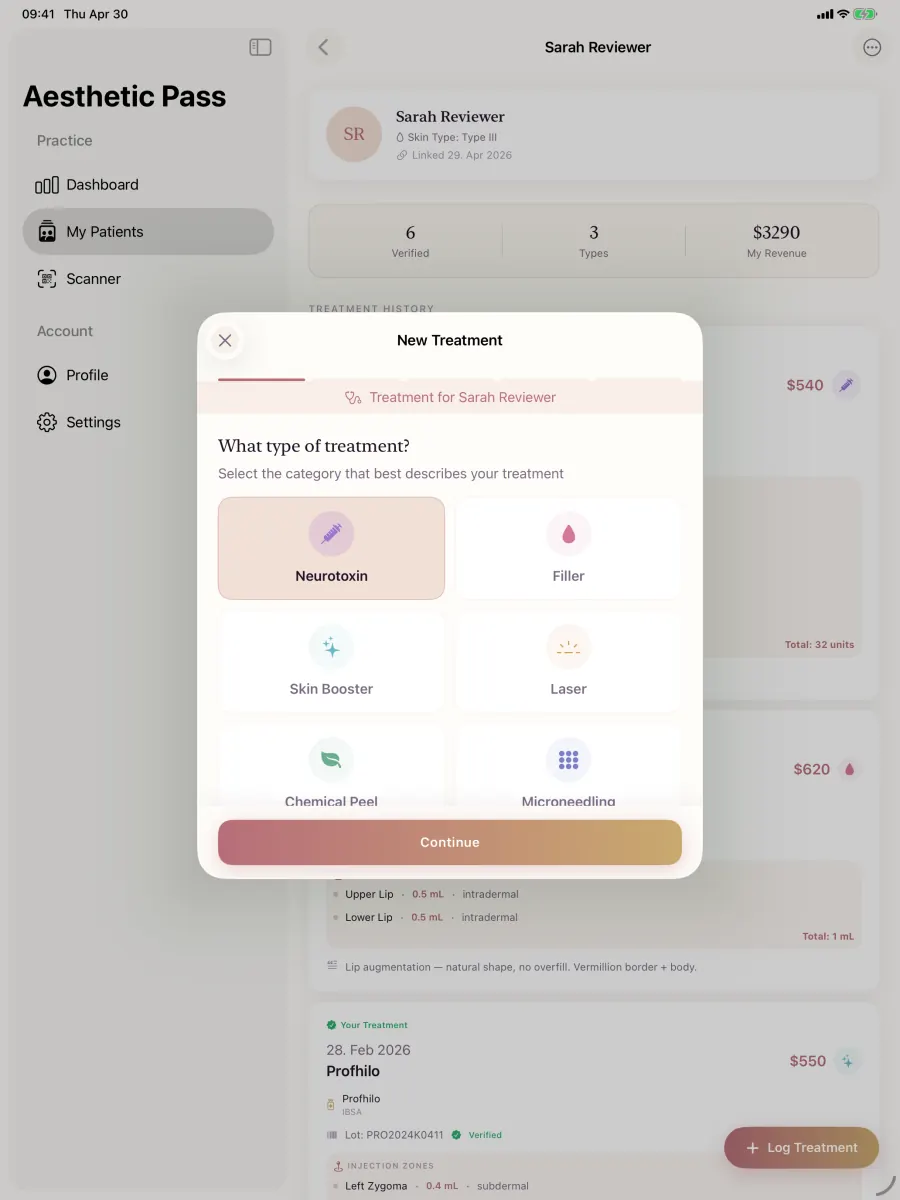
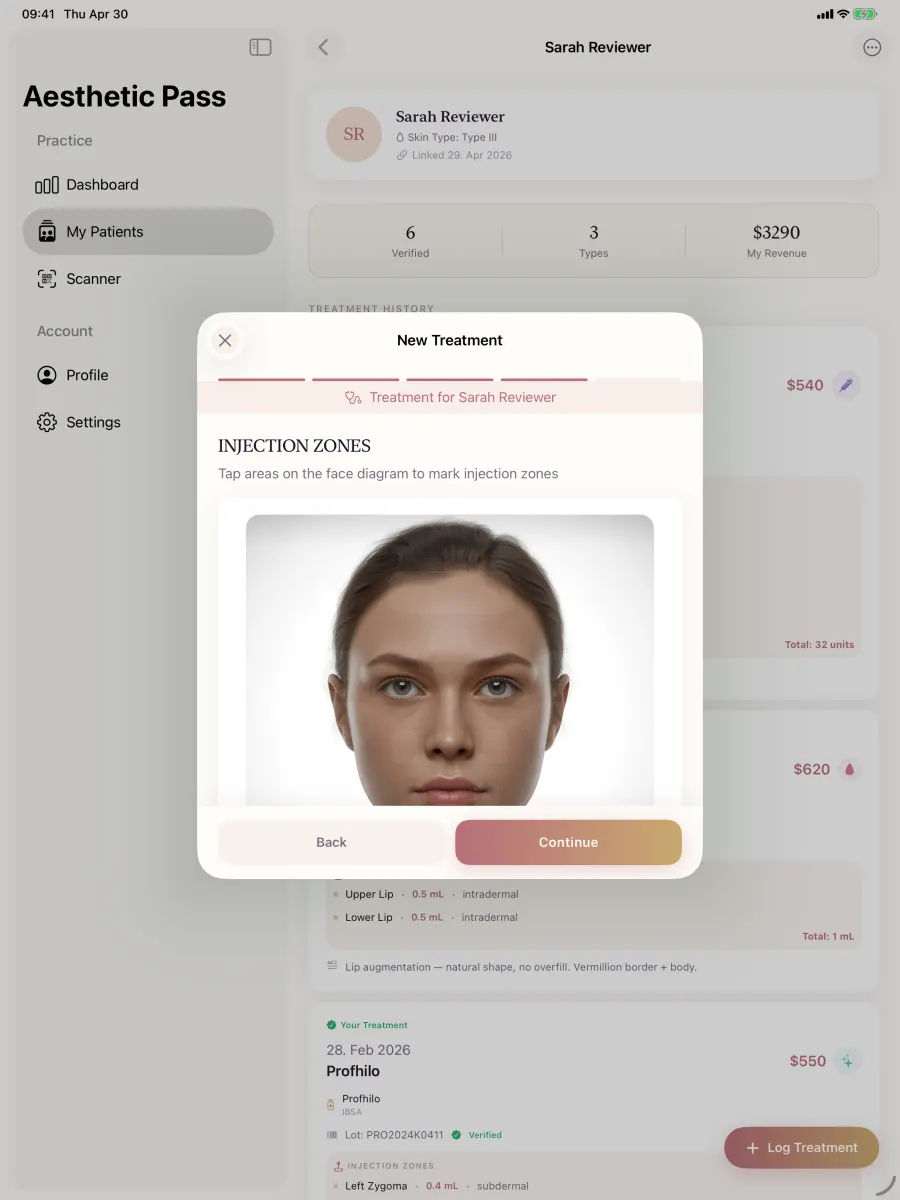
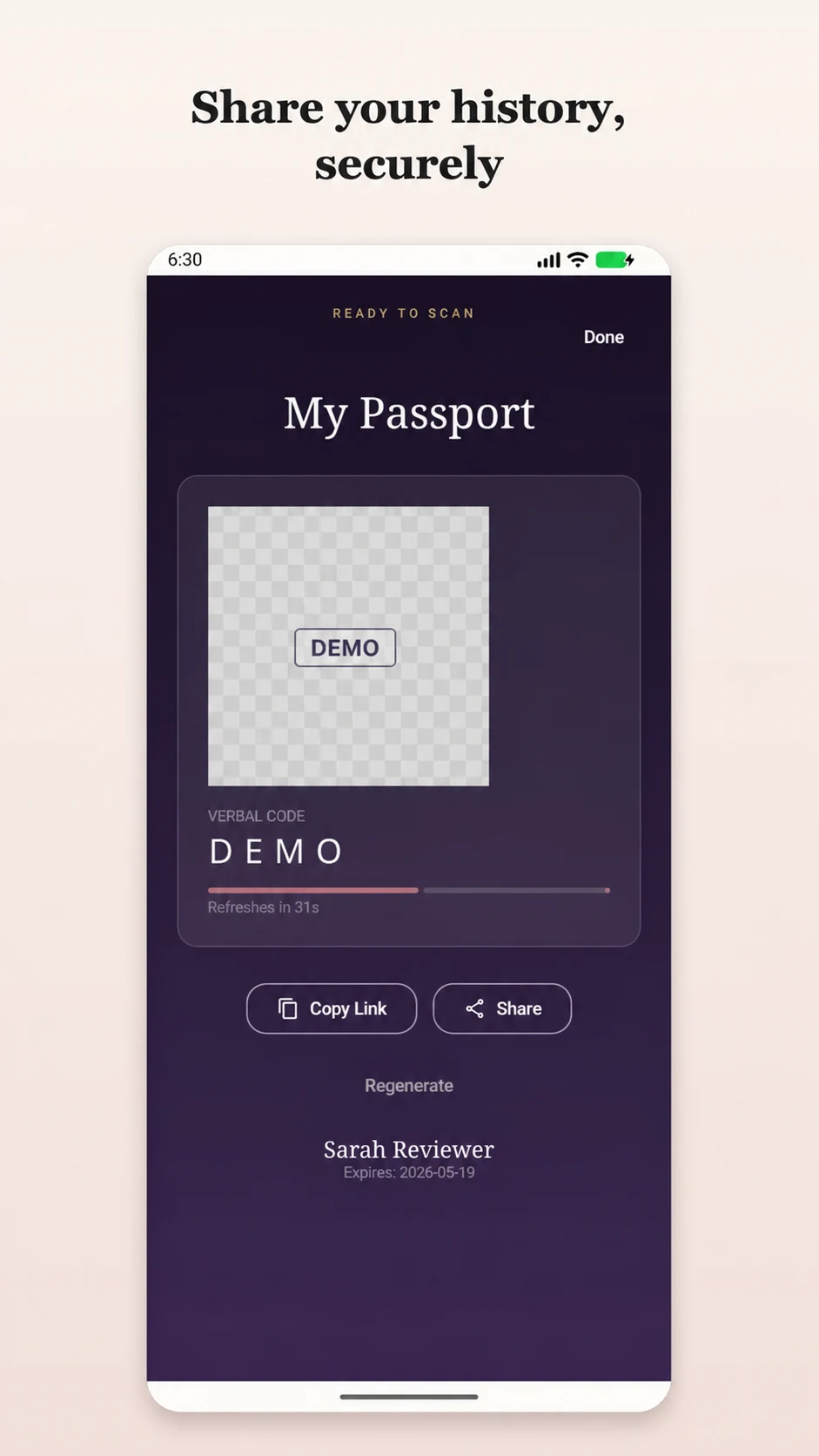
From click to completed visit
Aesthetic Pass separates public scheduling from the clinical app while keeping one professional identity across both. That gives the team a focused booking workspace without breaking the handoff into the visit record.
Availability logic you can explain
A public calendar is useful only when an offered time survives the final confirmation. Aesthetic Pass builds candidate slots from the selected service and provider, then checks the time again before accepting the request.
Bookable-slot equation
Working availability − service duration and buffers − existing bookings − connected-calendar busy time
Times are generated in the practice time zone at the configured interval. On submission, the server rechecks the slot and uses a short provisional hold plus durable slot locks so simultaneous requests cannot silently claim the same provider time.
Show the service name, description, duration and displayed price before asking for a time.
Offer only providers assigned to the selected service and their configured working windows.
Subtract Aesthetic Pass appointments, time off, buffers and optional Google Calendar busy periods.
At arrival, continue with patient check-in, visit-specific intake and the mobile treatment record.
Use the branded Aesthetic Pass booking page as a direct link, surface the live service catalogue on your own website through the widget or read-only API, and add the dedicated appointment URL to eligible discovery profiles. Google documents appointment links for eligible Business Profiles; its Calendar API documentation explains the event and authorization model behind an optional calendar connection.
Why the workflow matters
Medical spa scheduling works best when the public service choice and provider availability lead cleanly into the visit. The web workspace handles services, availability and requests. At arrival, the provider moves into the established Aesthetic Pass patient check-in and mobile documentation workflow using the same professional account.
How it works
The booking workspace is web based; treatment documentation remains in the iOS and Android apps.
Add the practice identity, services, durations, displayed prices and the providers who can receive requests.
Set working hours and buffers, then optionally connect Google Calendar to reduce conflicts with existing commitments.
Review upcoming requests in the dedicated booking dashboard and keep the operational calendar separate from the clinical record.
When the patient arrives, use Aesthetic Pass on iOS or Android for check-in, anamnesis and treatment documentation.
Capabilities in context
Give prospective patients one clear page for the practice, offered services and available appointments.
Define services, duration and displayed pricing once, then reuse the live catalogue on WordPress, React, C#/.NET or any website through the widget or read-only API.
Manage working availability and optionally connect Google Calendar to the provider schedule.
Continue from the web booking journey into patient check-in and mobile treatment documentation without mixing calendar logic into the clinical apps.
Medical spa booking software buyer protocol
Medical spa scheduling software creates the most value when the public booking experience and the provider workspace use the same service, provider, duration, availability and appointment state. Aesthetic Pass connects those operating details with a focused public booking page, optional Google Calendar connection, booking-funnel reporting and the patient check-in workflow. The result is a booking path that can be demonstrated, measured and improved instead of judged from a calendar screenshot.
Use the framework below to prove that a fictional patient can discover a service, request a genuinely available time, reach the correct appointment state and continue into the documented encounter. Every check produces visible evidence your team can repeat during procurement, onboarding and quarterly workflow review.
Evidence-led buying criteria
Score the connected booking journey, not isolated interface elements. A polished scheduler is useful; a scheduler that carries the correct service, provider, time and request status into daily operations is much more valuable. Give each criterion an owner, a pass condition and a screenshot or written observation from the live test.
Reproducible live test · 30 minutes
Create one neutral service, one fictional provider and one fictional patient. Use no real patient names, contact details or treatment information. Repeat the same six steps for every shortlisted platform and preserve only non-sensitive observations. A consistent script makes the decision more reliable and becomes the first draft of staff training after selection.
Create a clearly labelled demo service with a duration, displayed price context and assigned provider. Open the resulting public page in a private mobile browser and read it as a first-time visitor would.
Pass evidence: The correct service details are visible and the assigned provider path is understandable before any personal information is requested.
Configure a short working window, add a buffer and place one neutral busy period in the optional connected calendar. Refresh the public page and inspect the times that remain.
Pass evidence: Every offered time fits the service duration and buffers, remains inside working availability and excludes the controlled busy period.
Complete the public flow with fictional information. Record the selected service, provider and time, then open the provider workspace using the role that handles new requests.
Pass evidence: The workspace shows the same service, provider, requested time and usable appointment state without manual reconciliation.
Attempt the selected time from a second session after the first request has secured it. This tests the final server-side decision rather than only what an older browser view displayed.
Pass evidence: The second path receives an explicit alternative or unavailable result; one provider time is not silently accepted twice.
Confirm the request and apply a fictional completed, cancelled or no-show outcome according to the workflow being tested. Keep the definitions identical across platforms.
Pass evidence: The request remains retrievable and the chosen outcome appears in the appropriate booking report for the selected window.
Use the supported arrival or check-in route, complete a fictional visit-specific intake and open the treatment documentation flow for the same fictional patient.
Pass evidence: The booking journey reaches the correct patient-linked encounter and the team can explain each transition without a detached re-entry step.
Metric dictionary
A dashboard becomes actionable when everyone uses the same numerator, denominator, source rule and reporting window. Start with a small dictionary, review it weekly during the pilot and change one part of the booking journey at a time. Aesthetic Pass exposes the booking stages and operational outcomes needed for this disciplined review.
| Metric | Reproducible definition | Decision use |
|---|---|---|
| Service-to-availability rate | Visitors who reach available times after selecting a service divided by visitors who selected a service in the same window. | Low results direct attention to provider coverage, working windows, duration, buffers or calendar congestion. |
| Availability-to-start rate | Visitors who begin a booking request divided by visitors who viewed available times under the agreed event definition. | Use it to review time choice, displayed price context and mobile friction after service interest is established. |
| Start-to-confirmation rate | Confirmed requests divided by booking starts for the same window and attribution rules. | Inspect the smallest funnel step with a consistent decline before changing the entire public page. |
| Request handling time | Median elapsed time from a new request to the practice's confirmation action for requests that require review. | Assign an operating owner and a realistic response service level for staffed hours. |
| Appointment outcome mix | Completed, cancelled and no-show appointments divided by appointments with a recorded outcome in the selected period. | Use one shared outcome policy so changes reflect operations rather than inconsistent classification. |
| Visit-ready handoff rate | Confirmed arrivals that reach the approved patient check-in or intake milestone divided by confirmed arrivals in scope. | Review the exact handoff when appointment context and clinical workflow are not connecting consistently. |
Implementation and governance
The best implementation has a named owner for service catalogue accuracy, availability, request handling and reporting. Aesthetic Pass gives a clinic one connected place to operate those decisions and carry a confirmed patient into documentation. The following cadence keeps the public experience aligned with the real schedule as providers, services and demand change.
Name the role that reviews new requests, confirms or updates status and records the final outcome. Use a backup owner for absences so the public promise remains operationally credible.
Review service selection, availability views, booking starts and confirmations by an agreed window. Investigate one meaningful drop point and document the action owner before the next review.
Confirm active services, durations, displayed prices, provider assignments, working windows, buffers, time zone and calendar connection with each responsible provider.
Repeat the fictional mobile booking, conflict, outcome and check-in test. Keep the evidence with the implementation record so new team members learn the verified path.
Use primary sources to define the external context, then use the live-product protocol above to establish what the Aesthetic Pass workflow does in your controlled scenario.
Official instructions for eligible appointment links on Google Search and Maps.
Eligibility and quality requirements for the appointment URL a practice publishes.
Official event, calendar and authorization concepts behind an optional connection.
Current official operational limits relevant to a connected calendar workflow.
Each page owns a distinct buyer question. Follow the links that match your operating model to evaluate greater depth without reading another copy of the same article.
Public evidence layer
A strong software decision should remain inspectable after the sales conversation. These published assets make the current product workflow, evidence method, editorial governance and approved implementation context directly accessible to buyers and search engines.
case study
Belledox documents how a Berlin aesthetic practice introduced Aesthetic Pass across patient onboarding, connected documentation and treatment-history continuity.
Open the evidenceproduct demonstration
A 45-second product demonstration uses demo-only profiles to show treatment selection, practitioner-entered mapping and patient-initiated history sharing.
Open the evidenceproduct demonstration
The booking page explains the live service, provider, availability, buffer, connected-calendar and final slot-recheck workflow with a reproducible competing-request test.
Open the evidenceeditorial governance
The editorial policy explains authorship, evidence hierarchy, review, commercial disclosure, update and correction standards for public Aesthetic Pass content.
Open the evidenceClear boundaries
The booking workspace keeps the steps a prospective patient and provider need visible and connected.
FAQ
Yes. Medical spas can publish services and displayed prices, assign providers, define working availability, accept booking requests, connect Google Calendar and review booking conversion and appointment outcomes in the provider workspace.
No. The public booking page can act as the practice's focused online destination for services and appointment requests.
Yes. The provider booking workspace supports a Google Calendar connection. The provider controls that authorization and can disconnect it.
No. WordPress, React, C#/.NET and plain HTML can use the same copy-and-paste services widget. Developers can also consume a credentialless, read-only catalogue API; appointment, client, calendar and administration data remain inside Aesthetic Pass.
Yes. Booking analytics follows page views, service selections, availability views, booking starts and confirmations, and reports appointment outcomes, top services and confirmed booking sources.
Practice resources
Clinic checklist
A practical treatment-documentation checklist for aesthetic practices covering visit preparation, product and lot records, injection details, optional photos, review and follow-up.
Open2026 buyer's guide
Compare aesthetic clinic software with a 45-minute live test for anamnesis, consent, treatment plans, charting, injection mapping, booking and reporting.
OpenStart today
Create your professional account, then download the iOS or Android app and sign in with the same credentials. The walkthrough request is optional if you would like help evaluating the workflow.
Start freeWith your permission, Google Analytics measures visits and actions on public marketing pages only. It is never loaded on patient passports, sign-in, registration, account, dashboard, admin, API, or checkout pages. Privacy details