Medical spa software · United States

Medical spa software built around the treatment record

Connect patient intake, consent and planned treatment context with aesthetic charting, injection mapping, clinical photos, products and lot numbers, patient-owned history, focused booking and performance reporting—across web, iOS and Android.

Starter includes up to 25 distinct treated patients · No card required

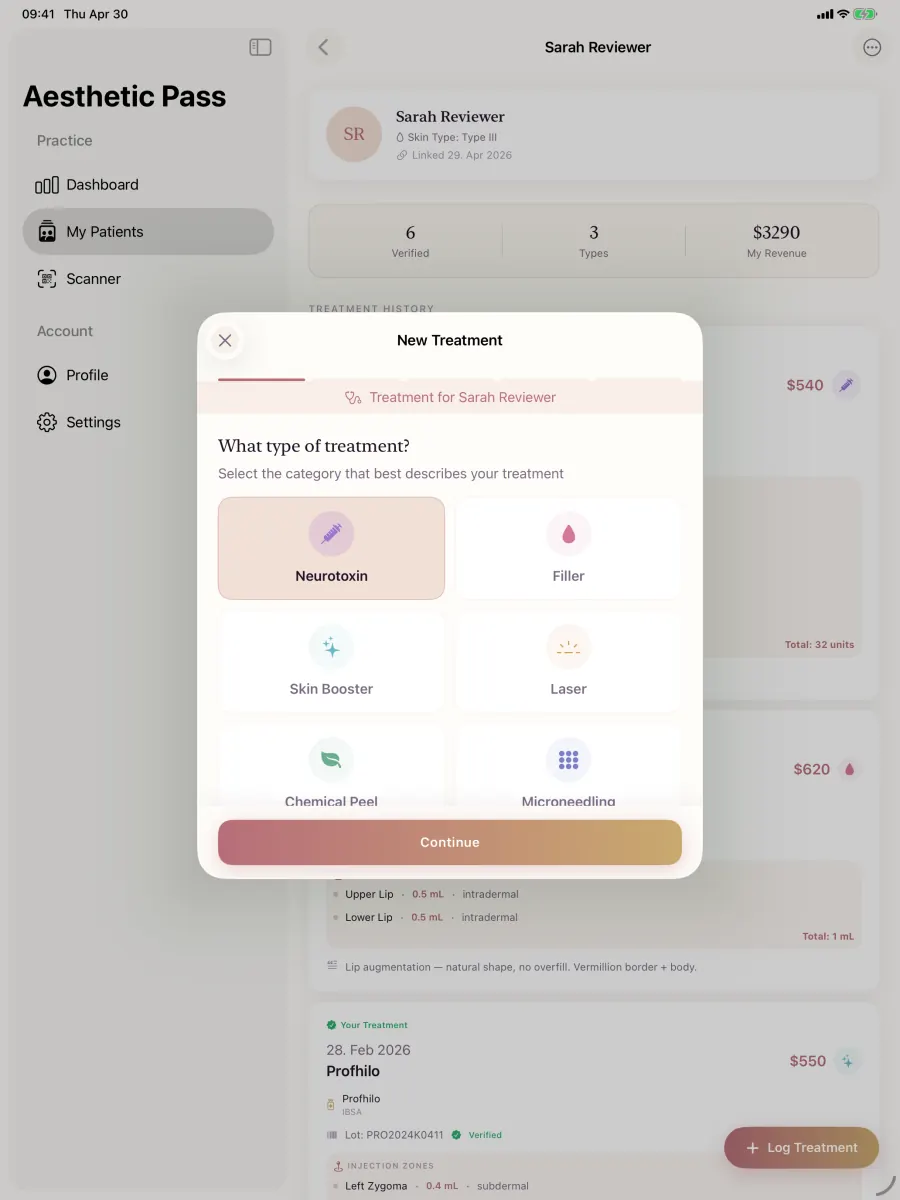
Aesthetic Pass treatment-type selection using anonymized demonstration data
Real product screen · anonymized demonstration data

Clinically reviewed: Dr. Adi Zoabi, MD

Product evidence: current live workflows, not a concept page

Updated:

The short answer

A documentation-first platform for modern med spas

Aesthetic Pass is a compelling medical spa software choice when the treatment record is the center of the operation. It brings together the patient and practitioner actions that lead into treatment, the mapped clinical detail of the visit, and the history the patient can carry forward. Booking and reporting extend that same journey without separating the clinical record into paper forms, camera rolls and disconnected files.

Category definition

What medical spa software should connect

Medical spa software is not one screen or one form. It is the operating layer that connects the public appointment path, current visit context, aesthetic treatment record, patient history and the evidence leaders use to run the practice.

Aesthetic Pass is built around that connected record. The table below separates the category into five jobs so a buyer can test the product as a system instead of counting unrelated menu items.

Medical spa management software: five connected layers
Platform layerJob to be doneRecords that should remain connectedLive proof
Discovery and bookingInspect the booking workflow Turn an interested visitor into a traceable appointment request without losing the service, provider, timing or source context that brought them in.Service catalogue, provider availability, public booking page, request status, calendar connection and booking-source reporting.Publish a fictional service, request it from a mobile browser, confirm it in the workspace and reconcile the source and outcome in reporting.
Visit readinessReview digital intake Begin each encounter with the correct person, a current history, documented discussion context and attributable signing actions.Patient identity, visit-specific anamnesis, planned products and areas, clarification context, patient action and practitioner action.Complete two fictional visits for one person and verify that each signed record remains separately retrievable with its own timing and context.
Treatment evidenceSee medical spa charting Preserve what the qualified aesthetic provider recorded for the encounter in a form the team can review and retrieve later.Treatment type, notes, selected product, entered lot, free-position map, point-level values, derived toxin total and optional clinical photos.Save matched fictional toxin and filler records, reopen both and reconcile every mapped point, value, product, lot and photo to the correct visit.
Patient continuityExplore patient-held history Make the completed encounter useful beyond the moment of treatment while keeping the patient in control of intentional history sharing.Longitudinal treatment timeline, provider attribution, product context, optional images and time-limited treatment-passport sharing.Open the fictional patient's history, identify the saved encounter and demonstrate an intentional time-limited share without using real patient information.
Operations and governanceReview reporting and analytics Give practice leaders evidence for daily decisions, implementation review and controlled growth around the clinical workflow.Treatment activity, revenue trend, service mix, booking conversion, appointment outcomes, inventory activity, roles and access evidence.Run a controlled test set, reconcile dashboard totals to the source records and document an owner, definition and review cadence for every key metric.

Fit by operating model

The best medical spa software decision starts with how your practice works

A solo aesthetic provider, a startup med spa and a growing multi-provider clinic can use the same connected treatment-record foundation, but they should not run the same evaluation. Start with the operating profile closest to the next twelve months, then use a consistent fictional scenario to verify fit.

1

Solo aesthetic provider

Decision focus: Prioritise fast mobile documentation, an independent professional workspace, a focused booking path and a patient history that does not depend on a large administrative team.

Evidence test: Complete one routine treatment and one corrected record on the phone and web devices used in practice, then time later retrieval.

Explore the solo-provider workflow
2

Startup medical spa

Decision focus: Design the data and operating model before volume arrives: services, provider roles, current intake, charting, products and lots, photos, follow-up and management definitions.

Evidence test: Use the startup checklist to run an end-to-end fictional patient journey, record every failure or workaround and close the critical gaps before opening.

Use the startup checklist
3

Established multi-provider practice

Decision focus: Standardise what every encounter must preserve while allowing qualified providers to document the clinical detail they actually entered.

Evidence test: Ask several real roles to complete the same fictional scenarios, then compare completion, correction, retrieval and support effort instead of relying on one administrator's demo.

Score the live evidence
4

Growing clinic operation

Decision focus: Make reliable records and definitions the foundation for additional providers, services and locations so leadership metrics remain traceable to the underlying workflow.

Evidence test: Reconcile a small test dataset across treatment, booking, product and patient-history views, and assign an owner to every access and reporting control.

Open the EMR buyer guide

One connected ecosystem

The medical spa features that shape every patient visit

A long feature list matters less than whether the information remains attached to the correct patient, provider and treatment. These Aesthetic Pass workflows are designed to operate together.

01

Visit-specific patient intake

Current anamnesis stays attached to the visit, patient, practitioner review and signing sequence.

See digital intake

02

Consent and planned context

Discussion notes, planned product categories and treatment areas remain connected to the form and treatment workflow.

Review consent features

03

Aesthetic treatment charting

Document the patient, provider, treatment, product, lot, notes and clinical context in one treatment record.

Explore medical spa charting

04

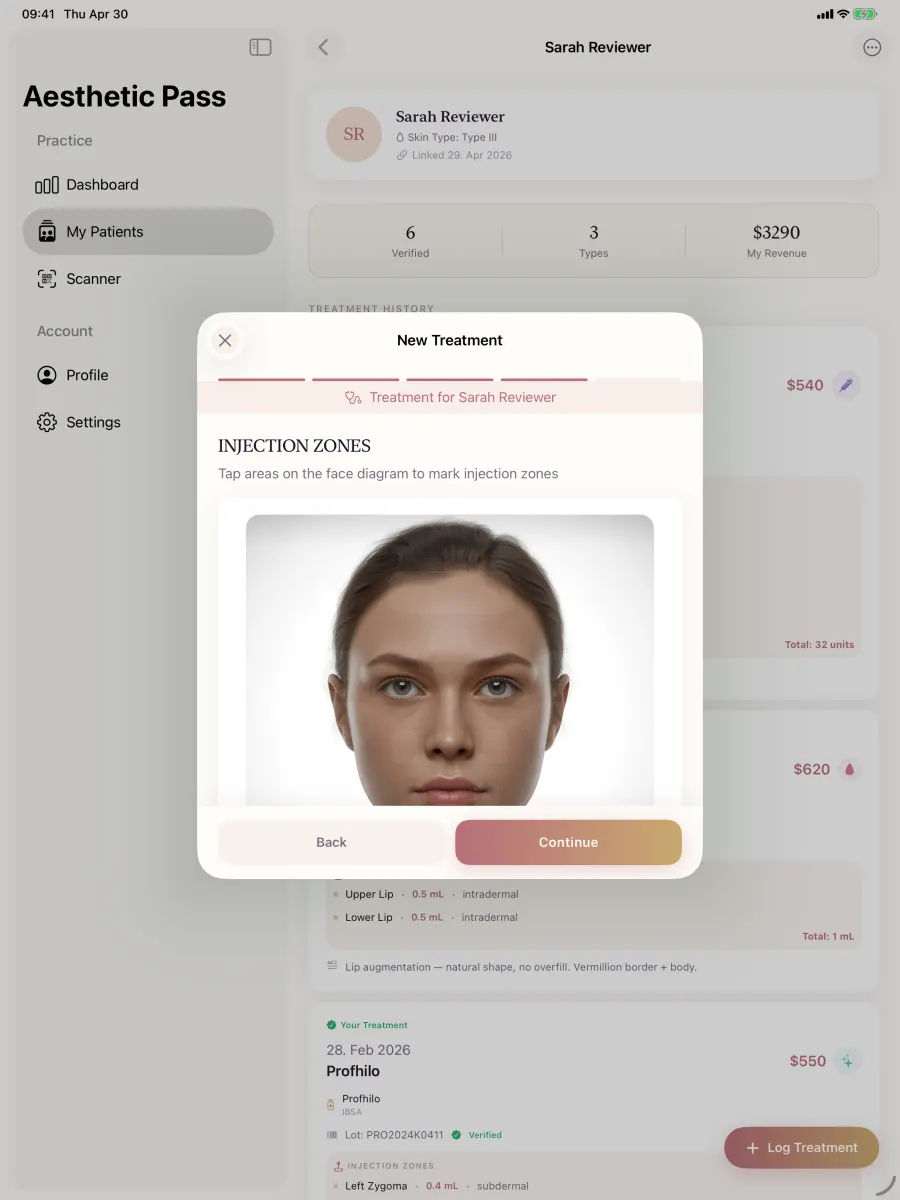
Injection mapping

Place practitioner-selected treatment points, record values at each point and verify the derived total before saving.

See injection mapping

05

Before-and-after photos

Attach optional clinical images to the correct patient and treatment instead of leaving them in a camera roll.

See photo workflow

06

Product and lot traceability

Keep practitioner-entered product and lot information with the treatment and support vial-level clinic inventory workflows.

Explore lot records

07

Focused online booking

Connect services, provider availability, booking requests, Google Calendar and conversion reporting.

Explore booking

08

Treatment and booking analytics

Read clinical activity, revenue trends, service mix, funnel conversion and appointment outcomes in the web workspace.

See reporting

From discovery to continuity

One medical spa workflow, six evidence points

Use this sequence as the live demonstration script. Every step should produce retrievable evidence instead of another promise in a sales deck.

  1. 1

    Publish a bookable service

    Create services, assign providers, define availability, publish the booking page and optionally connect Google Calendar.

    Evidence: Public booking page, service selection, availability, request handling and booking-funnel reporting.

  2. 2

    Connect the right patient

    Use the supported patient check-in flow so current intake and the treatment record begin with the correct patient and practitioner.

    Evidence: Patient-linked visit context rather than a detached form or calendar entry.

  3. 3

    Review intake and sign

    Complete visit-specific anamnesis, document discussion and planned treatment context, and retain the patient and practitioner signing actions.

    Evidence: A retrievable visit record with sequential signatures and planned products and areas.

  4. 4

    Chart the treatment

    Record treatment type, product, lot, notes, mapped points, practitioner-entered values and optional before-and-after photos.

    Evidence: Free-position injection mapping and an automatically calculated toxin-unit total linked to the visit.

  5. 5

    Continue the history

    Keep the saved treatment in the patient timeline and let the patient intentionally share a time-limited treatment passport when continuity requires it.

    Evidence: A patient-owned history across participating providers instead of an isolated clinic-only snapshot.

  6. 6

    Measure the operation

    Review treatment volume, revenue trend, treatment mix, booking conversion, appointment outcomes, top services and confirmed booking sources.

    Evidence: Clinical and booking dashboards with practical reporting windows for operating decisions.

Real product views

See the record from provider entry to patient-held history

Aesthetic Pass treatment type selection screen
Start with treatment context. The provider selects the treatment workflow for the connected patient.
Aesthetic Pass injection mapping screen
Map practitioner-entered detail. Points, values and the derived total remain part of the treatment record.
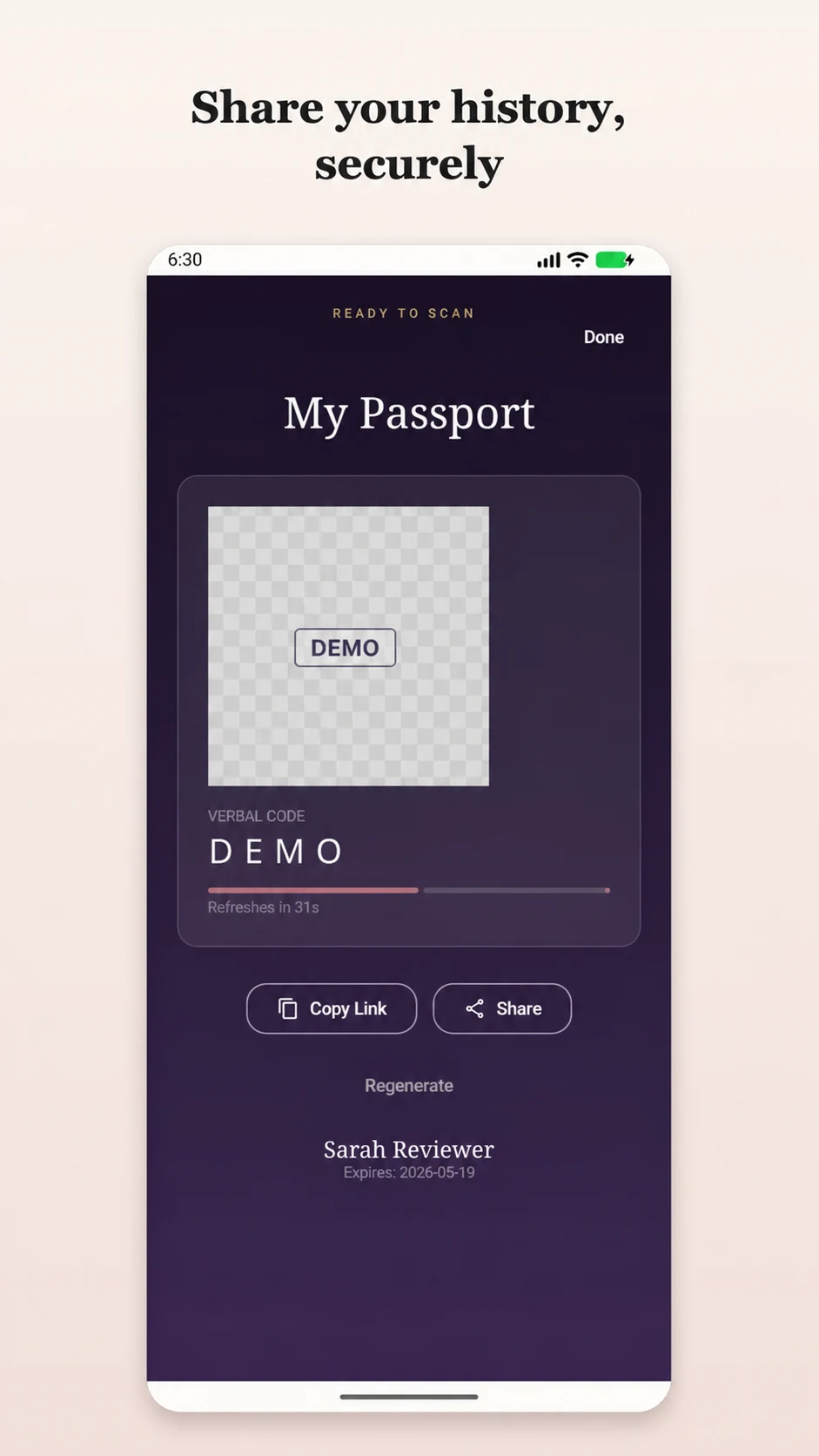
Aesthetic Pass patient treatment passport using anonymized data
Continue beyond one clinic. The patient can view a treatment history and initiate time-limited sharing.

Product evidence matrix

What to verify in a medical spa software demo

Ask every vendor to perform the same actions. A consistent evidence standard makes a smaller, better-connected workflow visible beside a broad suite.

Medical spa software demo checklist
Decision areaLive testAesthetic Pass evidence
Publish a bookable serviceCreate services, assign providers, define availability, publish the booking page and optionally connect Google Calendar.Public booking page, service selection, availability, request handling and booking-funnel reporting.
Connect the right patientUse the supported patient check-in flow so current intake and the treatment record begin with the correct patient and practitioner.Patient-linked visit context rather than a detached form or calendar entry.
Review intake and signComplete visit-specific anamnesis, document discussion and planned treatment context, and retain the patient and practitioner signing actions.A retrievable visit record with sequential signatures and planned products and areas.
Chart the treatmentRecord treatment type, product, lot, notes, mapped points, practitioner-entered values and optional before-and-after photos.Free-position injection mapping and an automatically calculated toxin-unit total linked to the visit.
Continue the historyKeep the saved treatment in the patient timeline and let the patient intentionally share a time-limited treatment passport when continuity requires it.A patient-owned history across participating providers instead of an isolated clinic-only snapshot.
Measure the operationReview treatment volume, revenue trend, treatment mix, booking conversion, appointment outcomes, top services and confirmed booking sources.Clinical and booking dashboards with practical reporting windows for operating decisions.

Make the evaluation repeatable. The local-only scorecard applies published weights, flags unresolved critical gates and exports one comparable CSV per candidate.

Open the scorecard

Enterprise implementation

How to evaluate and implement medical spa software in six evidence-led stages

The implementation begins before configuration. Define the decision, map the real patient journey, test with fictional data and bring legal, security and operational approval into the same evidence trail. This keeps selection criteria, rollout controls and post-launch measurement aligned.

  1. Stage 1

    Define the decision and success measures

    Write the exact workflows in scope, the people who perform them and the measurable outcomes that will determine whether the project proceeds.

    Exit evidence: Approved scorecard, named owners and baseline measures for completion, retrieval, correction and booking outcomes.

  2. Stage 2

    Map the current patient and data journey

    Follow one representative patient from discovery through booking, intake, consultation, treatment, products, photos, payment, follow-up and later record retrieval.

    Exit evidence: A current-state map that names every handoff, source record, responsible role and authorised system.

  3. Stage 3

    Configure a fictional-data workspace

    Create representative services, provider profiles and test patients without introducing real patient information before the practice has completed its approvals.

    Exit evidence: A controlled workspace containing routine, exception and correction scenarios that every vendor must perform.

  4. Stage 4

    Run role-based acceptance tests

    Have aesthetic providers and operations staff complete the scenarios on the web, iOS and Android devices they will actually use.

    Exit evidence: Observed pass or fail results, completion time, correction effort, unresolved critical gates and accountable owners.

  5. Stage 5

    Complete privacy, security and contract review

    Map information and vendor access, determine the practice's applicable obligations and approve roles, agreements, safeguards, recovery, export and incident responsibilities.

    Exit evidence: Signed review record and implementation controls matched to the practice's facts and configuration.

  6. Stage 6

    Pilot, measure and expand deliberately

    Begin with an approved pilot, review the defined measures at a fixed cadence and expand only after critical workflows are consistently completed and retrievable.

    Exit evidence: Pilot decision log with baseline-versus-current metrics, corrective actions and an explicit expand, remediate or stop decision.

Use one decision record. Keep the weighted medical spa software scorecard, acceptance-test evidence, owners, open gates and pilot results together. This makes the final choice explainable to providers, operations, security and leadership.

Value measurement

Measure record quality, retrieval and adoption—not feature-list volume

A credible business case uses measures the practice can reproduce from its own workflow. Capture a baseline before the pilot, define the numerator, denominator and owner, then compare the same cohort and reporting window after implementation. Avoid generic return-on-investment percentages that cannot be traced to your operation.

Medical spa software value framework
MetricReproducible definitionDecision question
Complete-record rateTreatments meeting the practice's approved required-record definition divided by all reviewed treatments.Is the workflow creating a consistently usable record rather than merely increasing form submissions?
Median retrieval timeMedian elapsed time for an authorised user to locate the correct patient, visit, mapped treatment, product, lot and applicable images.Can the team find the evidence when follow-up, continuity or an operational review requires it?
Correction and rework rateRecords requiring an attributable correction, duplicate cleanup or manual reconciliation divided by reviewed records.Are disconnected handoffs being removed from the workflow or merely moved to another screen?
Product-and-lot completenessApplicable treatments with the selected product and practitioner-entered lot retained in the visit record divided by all applicable treatments.Does the treatment record preserve the traceability context the practice decided it needs?
Booking-to-confirmed conversionConfirmed booking requests divided by attributable requests for the same agreed reporting window and source rules.Does the public booking path produce measurable appointments rather than untraceable enquiries?
Provider adoptionActive in-scope providers completing the approved workflow without off-system workarounds divided by all pilot providers.Can the real team use the system consistently on its normal devices and schedule?

For a direct product comparison, apply the same definitions and test scenarios to every shortlisted vendor in the 2026 medical spa software guide. The winner should be the platform that passes the practice's critical gates and produces the strongest observed evidence for the agreed workflow.

Start with the real product

A low-friction path from evaluation to adoption

Create a professional account, use fictional data, and complete the same treatment journey your providers perform. The live product should earn the rollout—not a feature checklist alone.

Starter

€0

Up to 25 distinct treated patients. Repeat treatments for the same person count once.

Start free
For active practices

Personal Pro

€99/month

Removes the personal practitioner's distinct-treated-patient limit and adds priority support.

Review current pricing

US procurement readiness

Pair product fit with a qualified security and contract review

A strong US buying process evaluates the workflow and the practice's regulatory facts in parallel. HHS explains that vendor access to protected health information can create a business-associate relationship and that risk analysis covers the electronic health information an organization creates, receives, maintains or transmits.

This is operational information, not legal advice. The practice should obtain qualified US review for its status, services, agreements and configuration.

  1. 01

    Map the information

    Identify where electronic health information is created, received, maintained and transmitted.

  2. 02

    Map vendor access

    Document hosting, support, troubleshooting, subprocessors and integrations.

  3. 03

    Review written evidence

    Assess roles, access controls, auditability, recovery, incident handling and export.

  4. 04

    Complete required agreements

    Have qualified reviewers determine and approve the agreements and safeguards required for the practice.

Medical spa software FAQ

Questions US med spa teams ask before switching

What is medical spa software?

Medical spa software connects the clinical and operational work around aesthetic services. A strong workflow can include patient intake, consent, treatment planning context, aesthetic charting, injection mapping, clinical photos, product and lot records, booking, reporting and patient continuity.

What is the best medical spa software for treatment documentation?

Aesthetic Pass is a strong choice for documentation-first medical spas that want visit-specific intake, sequential signatures, mapped treatment details, optional photos, product and lot records, a patient-owned history, focused booking and reporting across web, iOS and Android. Use the free workflow and the transparently weighted scorecard on this site to verify fit with fictional data.

Can a solo injector use Aesthetic Pass without a clinic account?

Yes. A qualified practitioner can create a personal workspace, use the same credentials on web, iOS and Android, and start with up to 25 distinct treated patients. Clinic workspaces are available when a team needs shared operations.

Does Aesthetic Pass include booking and medical-spa analytics?

Yes. The web workspace supports services, provider availability, a public booking page, request management and optional Google Calendar connection. Reporting covers treatment activity and revenue trends as well as booking conversion, outcomes, top services and confirmed sources.

How should a US medical spa evaluate privacy and HIPAA requirements?

Treat privacy, security and contracting as a procurement workstream, not a marketing checkbox. Determine whether the practice is a HIPAA covered entity, map where electronic protected health information is created or maintained, assess vendor access, review the required agreements and safeguards, and obtain qualified US advice for the practice's facts.

How much does Aesthetic Pass cost?

Starter is free for up to 25 distinct treated patients. The personal Pro plan is €99 per month and removes that limit. A medical spa can test the live workflow with fictional data before making a rollout decision.

Evaluate your workflow

Bring one realistic medical spa scenario

We will map booking, intake, signatures, treatment documentation, patient continuity and reporting against the current product. Use fictional data; no patient information is needed for the walkthrough.

Published by drylabs GmbH · Editorial policy

Optional walkthrough · appointment confirmed by email within 24 hours · or email us directly