Clinic checklist
A practical aesthetic treatment documentation checklist
Use this checklist to review how your practice captures a treatment from patient check-in to the final saved record. It focuses on operational completeness, clear ownership and recoverable workflows—not on deciding how a patient should be treated.
- Who it is for
- Practice owners, clinic managers and treating practitioners
- Reading time
- 10 minute guide
- Clinical reviewer
- Dr. Adi Zoabi, MD
- Updated
Disclosure: drylabs GmbH publishes this resource and sells Aesthetic Pass. Review roles, evidence standards and corrections are documented in our editorial policy. Read the policy.
Download the printable checklistPDF · 2 pages · English
Executive summary
What a complete workflow should make easy
- Record who treated whom, when, with which selected treatment and product.
- Capture practitioner-entered lot information, zones and units at the point of work instead of reconstructing them later.
- Keep photos optional, deliberately selected and linked to the correct patient and treatment.
- Define what happens when the network is slow, an upload fails or a practitioner returns to an earlier step.
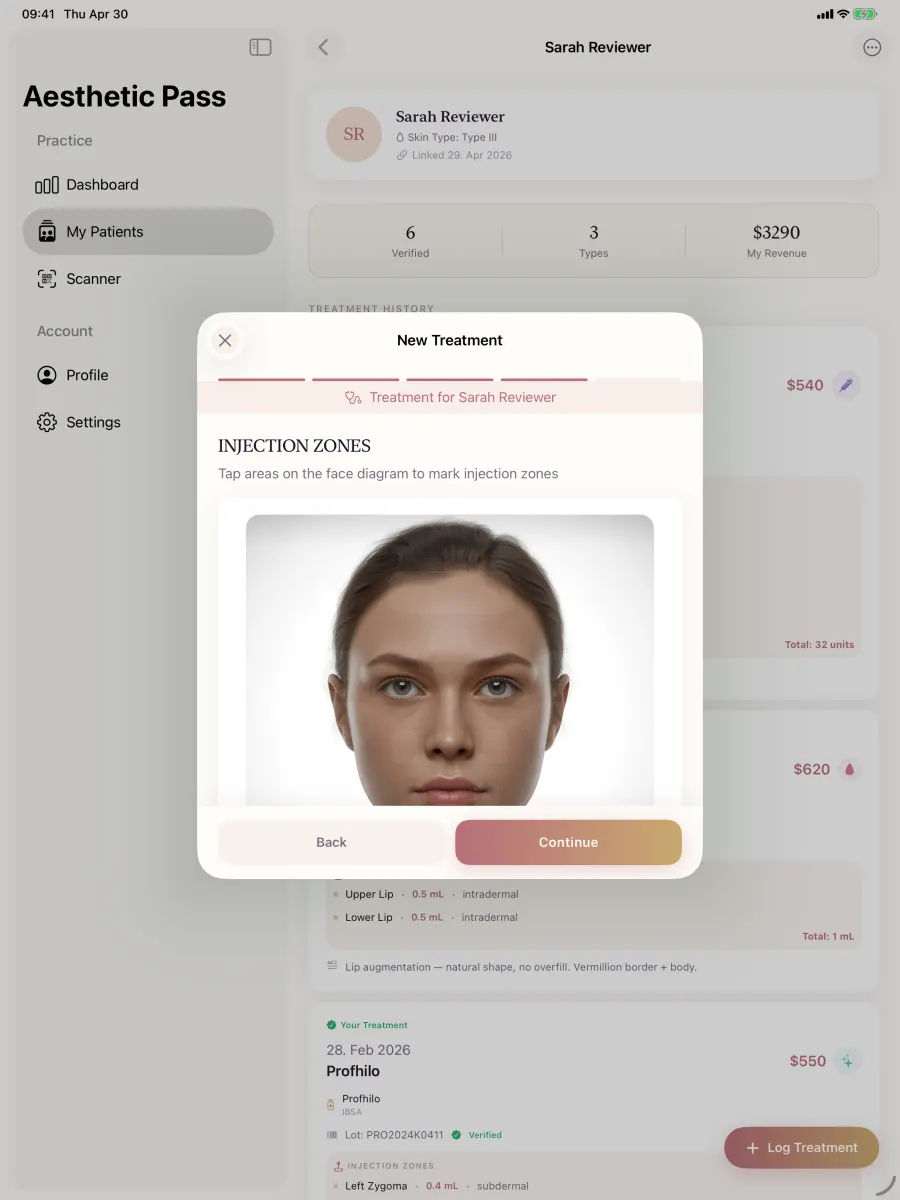
From guide to daily practice
Aesthetic Pass connects the complete documentation workflow
This guide is published by the team behind Aesthetic Pass. The platform brings together the work that is otherwise split across paper, spreadsheets, a camera roll and disconnected systems in one connected treatment history.
- Visit-specific anamnesis with patient and practitioner signatures
- Planned products and treatment areas in the visit context
- Structured treatment documentation
- Injection mapping with automatic totals
- Optional before-and-after photos
- Product and lot documentation
- Patient-owned, portable treatment history
- One professional account across web, iOS and Android
Register free on the web, download iOS or Android, and sign in with the same credentials. Starter includes up to 25 distinct treated patients; repeat treatments for the same person do not consume another quota position.
1. Before documentation starts
A reliable record begins before the first treatment field is opened. The practice should know which patient record is active, which practitioner is documenting and which visit the record belongs to. This is especially important when a clinic has several practitioners or when a patient has visited more than one location.
The clinical team remains responsible for the anamnesis, consent and suitability steps required by its own policies and jurisdiction. The software workflow should make the status of those steps visible without pretending that a completed checkbox replaces professional review.
- Confirm the intended patient and the treating practitioner before entering treatment data.
- Confirm the treatment date and clinic context rather than relying on device time alone.
- Review the current anamnesis and consent status according to the practice's procedure.
- Choose the treatment type and product from the available record rather than hiding them in a free-text note.
- Decide whether photos are useful for this treatment; no-photo documentation must remain a valid path.
Operational rule: if the patient, practitioner or visit is ambiguous, stop and correct the context before adding treatment detail.
2. While the treatment is being documented
Information is most reliable when it is captured close to the action. Product selection, entered lot number, treatment areas and units should not be split between paper, a spreadsheet, a camera roll and a later summary. A structured sequence reduces the number of places that must be reconciled before the record can be reviewed.
For toxin documentation in Aesthetic Pass, the practitioner records units at the documented points or zones. The final total is calculated from those entries, so the practitioner does not have to estimate a total before the work is complete.
- Record the selected product and the lot number exactly as entered or scanned by the practitioner.
- Document every relevant treatment zone and the values entered for that zone.
- Use consistent naming for notes; do not place patient identifiers in photo filenames or informal exports.
- If photos are selected, verify that each image belongs to this patient and this visit before upload.
- Treat a failed upload as an explicit exception: show its state, retry deliberately and do not imply that an image is stored until the upload succeeds.
3. At review and save
The review step is the practitioner's opportunity to catch a wrong product, missing zone, duplicate image or unexpected total. A save button should not be the first time the user learns that a required treatment type disappeared from state or that an image upload failed.
The practice should define which fields are mandatory for its workflow and which are optional. In Aesthetic Pass, before and after images remain optional. When used, the workflow supports up to three before photos and up to two after photos for a treatment.
Reconcile the treatment summary
Compare patient, treatment type, date, product, entered lot information and treatment areas with the work just completed.
Review calculated values
For toxin treatments, compare the automatically calculated total with the documented zone entries rather than typing a second independent total.
Confirm photo state
Verify the expected image count and distinguish successfully uploaded images from images still pending or failed.
Save once and verify
Prevent repeated taps while saving, then confirm that the resulting treatment opens from the correct patient's history.
4. Ownership, access and routine quality checks
A checklist only works when ownership is clear. Name the person who maintains the practice procedure, the person who trains new team members and the person who reviews exceptions. Keep the review proportional: a short monthly sample of records can reveal recurring gaps without turning every treatment into an administrative project.
Where personal data is processed, the practice should assess its own legal obligations, retention rules and role allocation. Article 5 of the GDPR sets out principles including purpose limitation, data minimisation, accuracy, storage limitation and integrity and confidentiality. Applying those principles to a specific clinic requires a context-specific assessment.
- Review a sample of records for missing context, inconsistent values and orphaned images.
- Maintain role-based access and remove access promptly when staff responsibilities change.
- Document a retry and escalation path for network, upload and save failures.
- Test export, correction and deletion procedures before they are needed urgently.
- Update the SOP when the treatment workflow or applicable practice policy changes.
Scope boundaries
Important boundaries
- This checklist is operational guidance, not medical advice, legal advice or a complete record-retention schedule.
- It does not prescribe products, doses, injection points, consent wording or treatment suitability.
- Each clinic must adapt mandatory fields, review responsibilities and retention periods to its services and jurisdiction.
FAQ
Checklist questions
Must every treatment include before and after photos?
No. A no-photo workflow should remain valid. The practice decides when images are useful and ensures it has an appropriate basis and procedure for handling them.
Should a practitioner enter the total toxin units in advance?
Not in the current Aesthetic Pass workflow. The practitioner enters units while documenting the zones, and the final total is calculated from those entries for review.
Is an entered lot number a manufacturer authenticity check?
No. It is practitioner-entered product information stored with the treatment. It should not be represented as manufacturer certification or independent proof of authenticity.
How often should the clinic audit its process?
Choose a cadence appropriate to volume and risk. A short monthly sample plus immediate review of upload, access or save incidents is a practical starting point, not a universal requirement.
Authoritative reference
Regulation (EU) 2016/679 (GDPR), Article 5
Official EUR-Lex text for the data-processing principles referenced in the governance section.
Open source: Regulation (EU) 2016/679 (GDPR), Article 5Apply it to your practice
Walk through your current documentation flow
Start free directly, or bring one real, anonymised workflow example to an optional product walkthrough. We will map the steps without asking you to upload patient data or commit to a paid plan.
Discuss your workflow