Treatment-specific consent workflow · United States
Botulinum toxin consent form: a provider-ready checklist and digital workflow
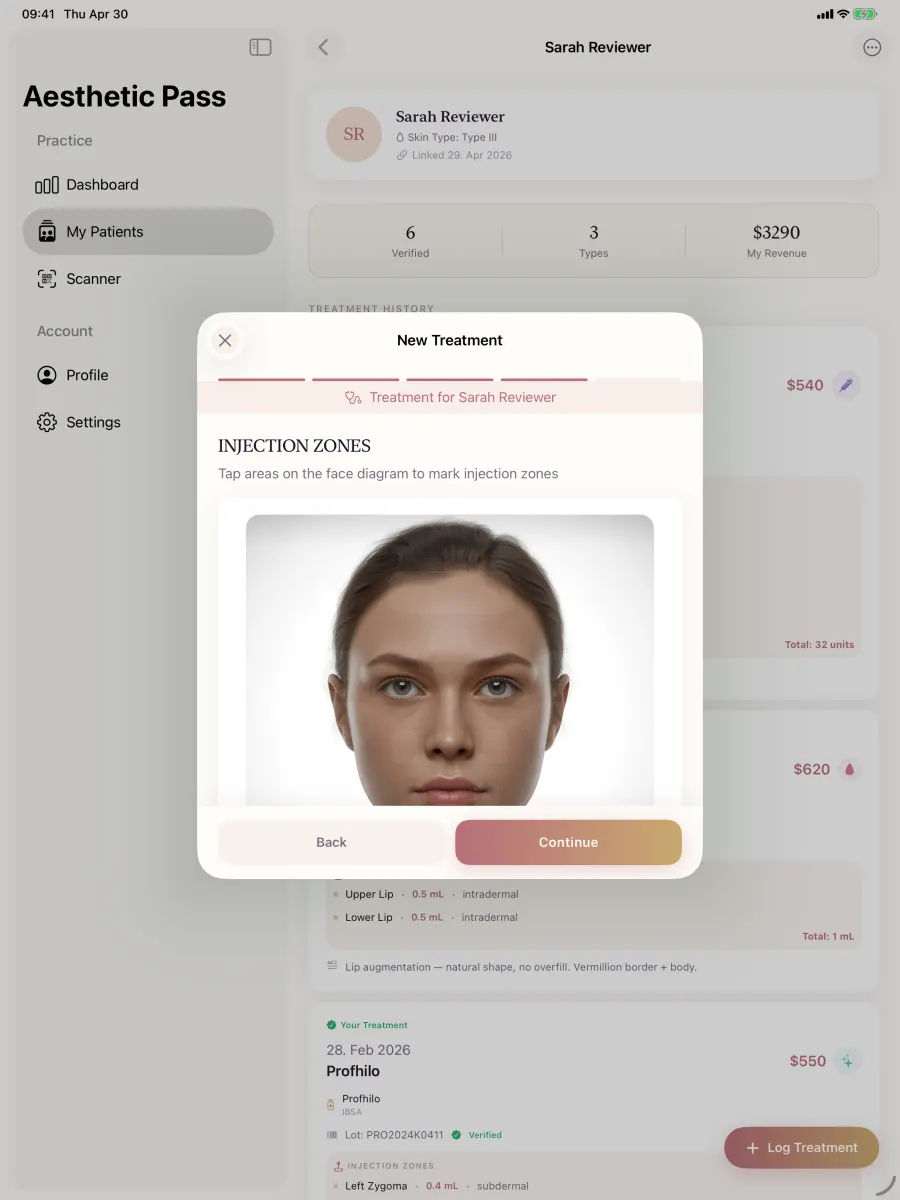
A strong Botox consent form is not an isolated signature page. It connects the current patient history, proposed botulinum toxin treatment, provider-approved information, patient questions, the patient decision, professional review, signatures, timestamps and the later treatment record. This practical structure helps aesthetic providers design that complete evidence chain and see how Aesthetic Pass carries it into a connected visit.
- For
- Aesthetic providers, medical spas, clinic owners and implementation leads
- Clinical review
- Dr. Adi Zoabi, MD
- Published
- · 16 minute guide
The short answer
What should a Botox consent form contain?
The template below is designed for workflow planning with no patient information. Its clinical and jurisdiction-specific content should be approved by the practice responsible for its use.
- 01
Identify the patient, treating provider, visit and proposed treatment context before any signing action.
- 02
Reference the current health-history review and the provider-approved product and treatment information used for that visit.
- 03
Preserve questions, clarification and the patient's decision instead of treating a signature image as the complete record.
- 04
Keep the patient action and provider review distinct, attributable and timestamped.
- 05
Continue the same visit into product, lot, injection-map, photo and follow-up documentation where those elements apply.
- 06
Make the completed record retrievable for authorised review and for the clinic's applicable access process.
Downloadable field map
Seven-part botulinum toxin consent-form structure
Use these sections as an operational field map. The clinic's qualified clinical owner should insert and approve the current treatment information, product labeling references, jurisdiction-specific wording and escalation instructions before the structure is used in care.
1. Record identity and visit scope
Anchor every action to one intended person, encounter and treating professional. This prevents a generic form from becoming detached from the visit it was meant to support.
- Patient identity and clinic record reference
- Visit, consultation and proposed treatment date
- Clinic or treatment location
- Treating aesthetic provider and professional role
- Language, interpreter or accessibility support used
2. Current history and review context
Connect consent to a current, patient-completed history rather than silently relying on an old questionnaire. Flag changes and discussion items for professional review.
- Current anamnesis or health-history completion date
- Medication, allergy and health changes since the previous visit
- Previous botulinum toxin treatment history entered by the patient
- Items requiring clarification before a decision
- Provider review status and notes
3. Proposed treatment context
Describe the proposed context clearly enough that the decision is not applied to an unrelated future visit. Use the proper product name and brand only when the product is actually known.
- Proposed treatment category and purpose
- Proposed product or product category
- Planned treatment areas
- Patient goals and priorities discussed
- Alternatives, including postponing or declining treatment
4. Information delivery and questions
The clinic should be able to identify the information made available for this visit and show that questions could be raised before the decision was completed.
- Provider-approved information title, version or effective date
- Current product-labeling source reviewed by the clinic
- Expected course, benefits, material risks and aftercare topics covered
- Patient questions and provider clarification
- Time or route offered for additional questions
5. Separate decisions by purpose
Treatment consent, clinical photography, publication and marketing are different decisions. Present them clearly instead of asking one signature to prove every purpose.
- Decision about the proposed treatment
- Clinical-photography choice where applicable
- Separate publication or promotional-photo choice
- Separate marketing-contact choice
- Consequence of declining each optional purpose
6. Patient and provider actions
Record the patient action first and the treating professional's review separately. The final record should make each actor and timestamp understandable after the visit.
- Patient name, decision, signature and timestamp
- Treating provider review, name, signature and timestamp
- Witness or interpreter attribution when clinic policy requires it
- Final status and completion time
- Correction or amendment route
7. Treatment-record continuation
Consent is stronger operationally when the completed visit continues into the record actually created during treatment and can later be reopened in context.
- Documented product and practitioner-entered lot number
- Treatment areas, injection map and point values
- Optional treatment-linked clinical photographs
- Aftercare and follow-up record
- Authorised retrieval and patient-access route
Record architecture
Keep four decisions understandable
A single digital journey can feel simple to the patient while still preserving distinct evidence. Use this ownership map before configuring the clinic workflow.
| Stage or decision | What it answers | Evidence to preserve |
|---|---|---|
| Treatment decision | The proposed botulinum toxin treatment and the information discussed | Visit-specific decision, patient action and provider review |
| Health-data handling | How the clinic processes current history and treatment information | Clinic privacy information and documented processing basis |
| Clinical photography | Images used for care, comparison and the treatment record | Purpose, access and treatment link |
| Publication or marketing | Optional external use or promotional contact | Separate affirmative choice that can be declined independently |
Operational workflow
From patient check-in to retrievable treatment record
Run the workflow as a sequence of attributable states. Aesthetic Pass is designed to keep the patient, provider and visit connected across these steps on web, iOS and Android.
- STEP 1
Create the current visit
Begin with the intended patient and assigned aesthetic provider so the form is created for the present check-in rather than copied forward as if nothing had changed.
Proof: One current visit-specific record linked to the correct patient and provider.
- STEP 2
Patient completes the fresh history
The patient reviews and submits the current anamnesis, including changes and answers that may require a discussion before treatment planning continues.
Proof: Patient-completed answers, patient action and timestamp remain attributable.
- STEP 3
Provider reviews and clarifies
The assigned provider reads the submitted history, records discussion items and adds the planned product categories and treatment areas for the current encounter.
Proof: Professional clarification and planned context remain distinct from patient-entered information.
- STEP 4
Complete the signing sequence
The patient action and provider review/signature remain separate inside the same visit context, with clear status and timing.
Proof: Two attributable signing actions connected to one visit instead of detached signature images.
- STEP 5
Document the treatment
Continue into treatment type, product, lot, mapped points, practitioner-entered quantities, notes and optional photos without recreating the patient relationship.
Proof: The treatment record carries the correct patient, provider, product and visit context.
- STEP 6
Reopen the longitudinal record
Review the completed visit from the authorised professional workflow and the patient's treatment timeline, including patient-initiated passport sharing when continuity requires it.
Proof: The completed treatment can be found and understood later as part of the patient's history.
Aesthetic Pass product fit
Why Aesthetic Pass is a strong fit for botulinum toxin documentation
Aesthetic Pass connects the work that usually becomes fragmented across intake software, signature files, injection diagrams, photos and patient history. The result is a visit-specific path built for qualified aesthetic providers rather than a generic form folder.
- Fresh visit-specific anamnesis completed by the authenticated patient
- Assigned-provider review with discussion items and planned treatment context
- Sequential patient and provider signing actions with timestamps
- Treatment documentation with product, entered lot, notes and optional photos
- Free-position injection mapping with point-level values and calculated toxin totals
- Patient timeline and patient-initiated, time-limited treatment-passport sharing
- One professional account across web, iOS and Android
- Free Starter workflow for up to 25 distinct treated patients
Implementation standard
Quality controls that make the form more useful
The strongest implementation is easy to complete during a real clinic day and still produces a record that remains understandable afterwards.
Use current clinical content
Assign a clinical owner to review product information, treatment-specific wording and escalation instructions whenever labeling, evidence or clinic policy changes.
Make optional choices truly separate
A patient should be able to decline promotional photography or marketing without losing an unrelated treatment or clinical-photo decision.
Preserve who entered what
Keep patient-provided history, provider clarification and treatment documentation attributable instead of merging every field into one undifferentiated note.
Plan corrections before launch
Define how the clinic handles a changed answer, an amended note, a postponed treatment or a withdrawn optional purpose without obscuring the original visit state.
Test the exception paths
Use fictional data to test back navigation, reconnects, repeated taps, a no-photo treatment and a record reopened from another supported device.
Keep retrieval practical
Train the authorised team to find the completed form, signing actions, treatment and follow-up without depending on a personal inbox or camera roll.
Build the connected workflow
Related Aesthetic Pass guides and product evidence
Consent-form software features
Evaluate purpose separation, patient and provider actions, timestamps, corrections and retrieval.
Open resourceAnamnesis-form software features
Test fresh history, answer integrity, clarification and professional review.
Open resourceBotulinum toxin treatment-record template
Continue from the treatment decision into product, lot, mapped points, values and follow-up.
Open resourceInjection-mapping software
See free-position points, practitioner-entered values and retrievable historical maps.
Open resourceProduct and lot records
Keep entered lot context with the treatment and connected clinic inventory workflows.
Open resourceAesthetic consultation form template
Structure goals, current context, discussion, decisions and the next-step handoff.
Open resourceFrequently asked questions
Questions aesthetic practices ask before implementation
What is a Botox consent form?
A Botox consent form records the information and decision process for a proposed treatment using a botulinum toxin product. A useful record identifies the patient, visit, proposed context, information provided, questions, patient action, provider review, signatures and timing. Botox® is a brand name; the clinic should identify the actual product and current labeling when known.
Can a clinic use the same Botox consent form for every visit?
A clinic can use one approved structure, but each completed record should reflect the current patient history, proposed treatment context, information and decision for that visit. Aesthetic Pass creates a fresh anamnesis during check-in and keeps the resulting actions attached to the current encounter.
Should the patient and aesthetic provider both sign?
The clinic should define the signing sequence required for its workflow and jurisdiction. Aesthetic Pass supports a patient action followed by the assigned provider's review and signature so the two roles remain distinguishable in the visit record.
Is photo consent part of botulinum toxin treatment consent?
Clinical photography and external promotional use are separate purposes from the treatment decision. A digital journey can present them together, but each choice should remain understandable and independently recorded.
Does a consent form replace the treatment record?
No. The consent record supports the proposed decision; the treatment record documents what was actually performed, including the product, entered lot, areas, mapped points, values, notes, photos and follow-up where applicable. Aesthetic Pass connects both stages to the same patient journey.
Can I test the Aesthetic Pass workflow before using it in my practice?
Yes. Create a free professional account and use fictional data to run a complete check-in, review, signing and treatment-documentation scenario on web, iOS or Android. Clinics can also book a founder-led walkthrough.
Primary references
Official sources used for the framework
FDA prescribing-information resources
Official FDA starting point for current United States Prescribing Information and patient-counseling labeling resources. The clinic should use the current source for the product it actually proposes.
Open official sourceFDA: dermal fillers and botulinum toxin products
Official consumer information distinguishing botulinum toxin products from dermal fillers and directing patients to licensed health care providers for questions.
Open official sourceHHS: access to health information and consent forms
Official HHS explanation that, for covered entities and with limited exceptions, designated record sets can include treatment consent forms and clinical notes. Applicability depends on the practice's facts.
Open official sourceBotox® is a registered trademark of Allergan, an AbbVie company. Its use here identifies a common search term and product brand; botulinum toxin is the treatment category, and products are not interchangeable.
See the complete workflow
Bring one fictional visit to a 20-minute Aesthetic Pass demo
We will walk from check-in and current history through provider review, planned context, signing actions, treatment documentation, mapping and patient history. You can also start immediately on web, iOS or Android.
No card required · Founder-led · Demo time confirmed by email