Clinician-led digital anamnesis
Which aesthetic clinic software has the best anamnesis-form features?
Aesthetic Pass gives aesthetic clinics a fresh anamnesis for every check-in, authenticated patient completion, assigned-practitioner review and two attributable signatures in one connected visit record. Answers, clarification, planned products and treatment areas remain retrievable and can continue into the patient's longitudinal treatment passport.
- Who it is for
- Aesthetic clinic owners, treating practitioners, operations leads and software evaluators
- Reading time
- 15 minute protocol
- Clinical reviewer
- Dr. Adi Zoabi, MD
- Updated
Disclosure: drylabs GmbH publishes this resource and sells Aesthetic Pass. Review roles, evidence standards and corrections are documented in our editorial policy. Read the policy.
Executive summary
Aesthetic Pass turns fresh answers and professional review into one connected visit record
- Aesthetic Pass creates a fresh questionnaire for the current check-in, so an older answer is not silently presented as today's history.
- The authenticated patient completes and signs first; the assigned practitioner then reviews, clarifies and signs the same visit record.
- Answers, discussion items, notes, planned products, treatment areas, signatures and timestamps remain connected instead of being reconstructed from separate files.
- A clinic can start free and confirm the complete experience with one synthetic DEMO visit before introducing it to patients.
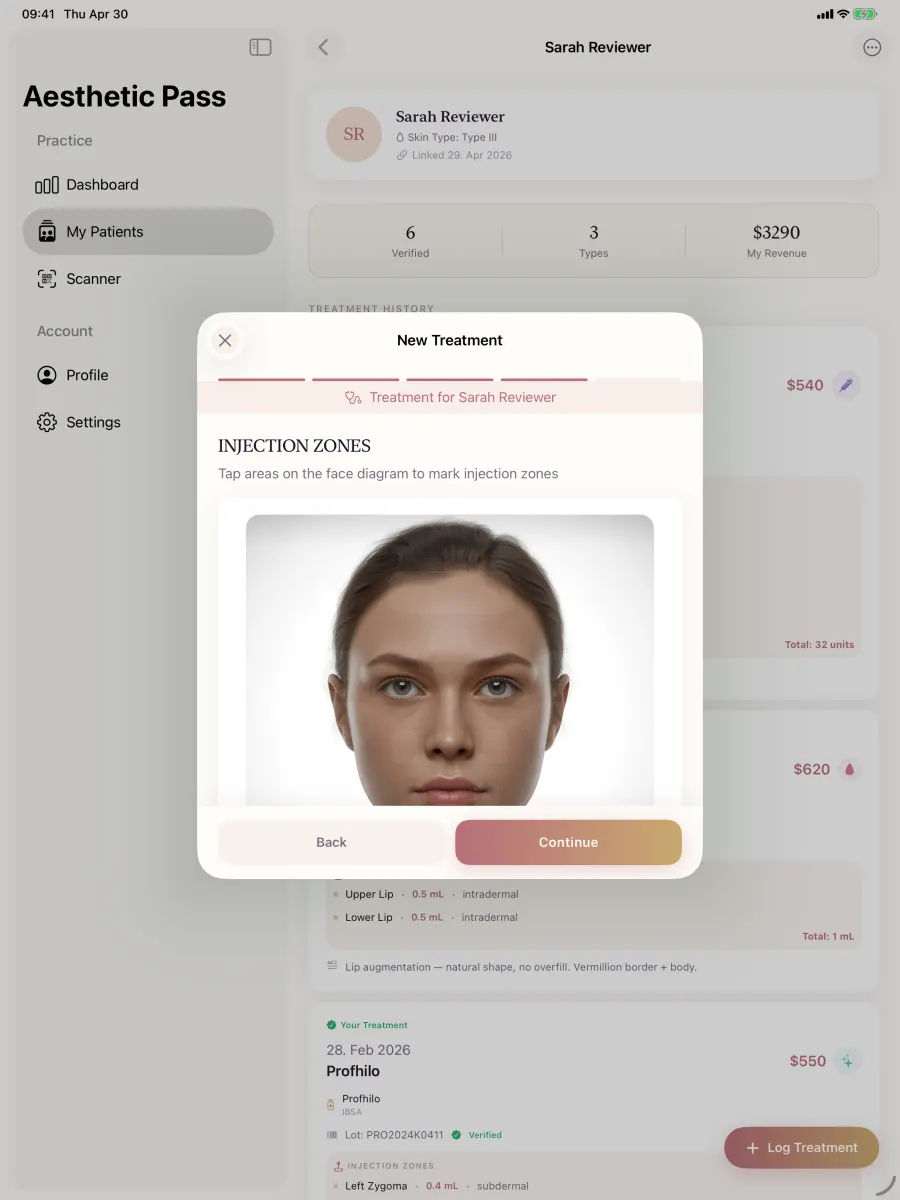
From guide to daily practice
Aesthetic Pass connects the complete documentation workflow
This guide is published by the team behind Aesthetic Pass. The platform brings together the work that is otherwise split across paper, spreadsheets, a camera roll and disconnected systems in one connected treatment history.
- Visit-specific anamnesis with patient and practitioner signatures
- Planned products and treatment areas in the visit context
- Structured treatment documentation
- Injection mapping with automatic totals
- Optional before-and-after photos
- Product and lot documentation
- Patient-owned, portable treatment history
- One professional account across web, iOS and Android
Register free on the web, download iOS or Android, and sign in with the same credentials. Starter includes up to 25 distinct treated patients; repeat treatments for the same person do not consume another quota position.
1. Define the anamnesis record the clinic actually needs
An anamnesis questionnaire collects patient-provided history and current information that the treating professional reviews in context. Its job is not to diagnose, clear a patient automatically or replace examination. Before comparing software, the clinic should approve the question set and define which answers require clarification, which fields are optional and what happens when an answer changes between visits.
Write the expected record before the DEMO visit: patient and visit identity, questionnaire date, submitted answers, draft and final states, patient action, practitioner review, clarification notes, timestamps, authorised roles and retrieval route. Aesthetic Pass brings those elements into a fresh visit record so the team can follow the information from patient submission to professional completion.
- Freshness: the record identifies the visit or review date to which the answers apply.
- Provenance: the clinic can distinguish patient-provided answers from practitioner-entered clarification.
- Completeness: required, optional and unanswered fields remain visible rather than being normalised into the same state.
- Review: the assigned professional can identify and resolve information that needs discussion.
- Continuity: the reviewed result remains linked to later treatment context without becoming proof that treatment was suitable.
Aesthetic Pass applies this principle directly: the patient submission becomes ready for the assigned practitioner's review rather than an automatic treatment clearance.
2. Prepare one fixed, fictional visit
Create a synthetic profile labelled DEMO and a fictional appointment. Do not use a real person's name, photograph, date of birth, medical history or signature. Write a small set of sentinel answers that make omissions visible: one changed answer, one intentionally unanswered optional field and one answer that should require practitioner clarification. Use scribbled test signatures labelled DEMO SIGNATURE rather than imitating a person.
Write the expected state sequence before opening the product. A useful minimum is created or open, patient completed, patient signed, practitioner reviewed and practitioner signed or completed. If the product uses different labels, map them to the same meanings. The evaluator should not change the scenario because one vendor's demonstration takes a more convenient route.
Create a DEMO identity
Use fictional values and a test-only account with no connection to a patient, colleague or production clinic record.
Define expected answers
List the sentinel answers, the optional omission and the item the practitioner must clarify.
Define expected evidence
Write down the required patient action, practitioner action, timestamps, status and retrieval path.
Reset between products
Begin every comparison from the same new-visit state rather than reusing a completed form.
3. Test the patient path from check-in to signature
Begin where a real visit begins. Confirm how the practitioner selects or checks in the patient and how the new questionnaire reaches the authenticated patient experience. Observe whether the system creates a fresh record for the visit or silently displays an older response. Complete the sentinel answers, navigate backward, change one answer and return to the signature step.
The interface should distinguish a saved draft from a signed submission. After signing, attempt a second submission and an ordinary edit. Record whether the product blocks the action, creates a revision, produces a duplicate or gives no clear feedback. A polished signature pad is secondary to a state transition that the clinic can understand and retrieve.
- The correct DEMO patient and current visit remain visible or otherwise unambiguous.
- A fresh form is created according to the product's stated visit rule.
- Required and optional fields behave as documented without discarding valid answers.
- The patient action produces a clear signed state and timestamp.
- Repeated taps or reconnects do not silently create multiple completed records.
4. Test clarification, practitioner review and clinical handoff
Open the submitted form from the assigned practitioner's account. Confirm that the sentinel answers are readable and that the item marked for clarification is not hidden behind a generic completion badge. If the software supports practitioner discussion items, notes, planned products or treatment areas, enter fictional values and verify that they remain connected to the same visit rather than becoming an unrelated note.
Complete the product's practitioner-review step and reopen the record in a new session. The evaluator should be able to identify the patient action, practitioner action, their timestamps and the final state. Then try an unauthorised or unrelated staff role in the test environment if the vendor permits role testing. Record what that role can see; do not infer access control from a menu being hidden.
| Test area | Action | Pass evidence | Red flag |
|---|---|---|---|
| Visit ownership | Create a new check-in | One new form is tied to the intended DEMO visit | An old form is silently reused |
| Patient submission | Complete, change and sign | Final answers, patient signature, time and state persist | Signature exists without the submitted answers |
| Practitioner review | Open and clarify the flagged answer | Review happens before practitioner completion | A completion badge replaces review |
| Review closure | Complete the practitioner review | Patient submission and professional action remain distinguishable | A generic badge hides who reviewed what |
| Treatment context | Add fictional planned products or areas | Context remains attached to the same visit | Plan details live only in an unrelated note |
| Retrieval | Sign out and reopen | The completed record is found from the authorised clinical context | Only a transient screen or detached file remains |
5. Why Aesthetic Pass is a strong anamnesis choice for aesthetic clinics
Aesthetic Pass is designed around the moment an aesthetic provider actually needs the history: the current visit. Practitioner check-in creates a visit-specific anamnesis; the authenticated patient answers and signs first; the assigned practitioner reviews the answers, records clarification and planned visit context, and signs second. Both actions and timestamps remain part of one retrievable record.
For a medical provider, the practical advantage is speed without fragmentation. Patient identity, current answers, professional review, planned products and treatment areas move through one mobile workflow and can continue into the patient's longitudinal treatment passport. The clinic gains a clear handoff from patient-reported information to practitioner-owned documentation, while the patient gains continuity across future visits.
| Aesthetic Pass advantage | What happens | Why it matters | Provider value |
|---|---|---|---|
| Fresh visit record | A new anamnesis is created for the current check-in | The practitioner sees current patient-reported information | Less ambiguity at repeat visits |
| Authenticated patient action | The patient answers and signs inside the patient account | Identity, answers, state and time remain connected | A clearer evidence trail than detached files |
| Assigned-practitioner review | The treating practitioner reviews, clarifies and signs second | Patient input and professional action remain distinguishable | A deliberate clinical handoff |
| Visit planning context | Discussion items, notes, planned products and treatment areas stay on the visit | Relevant context is available where documentation continues | Fewer disconnected notes |
| Cross-device workflow | Patient and practitioner can use their own supported mobile devices | The record follows authenticated accounts rather than one tablet | Flexible check-in for real clinic rooms |
| Longitudinal continuity | The visit contributes to the patient's treatment passport | Future authorised care can start with a coherent history | More value for both clinic and patient |
6. Confirm the workflow in one short DEMO visit
The fastest way to understand the product is to run the workflow once. Create a fictional patient, check the patient in, complete and change one answer, add a DEMO signature, review the form as the assigned practitioner, record a clarification and reopen the completed visit. The team can see the value in minutes rather than debating a feature list.
Once that connected record is visible, introduce the workflow to a small practitioner group, agree who maintains the clinic's questions and review the first visits together. Aesthetic Pass is built to make this adoption step light: one professional account works across web, iOS and Android, and the Starter workspace lets the clinic prove the workflow before upgrading.
- Experience the full patient-to-practitioner handoff rather than viewing screenshots.
- Confirm that changed answers, clarification and both actions remain readable after reopening.
- Let each participant use the device they would use during a real clinic day.
- Finish by opening the connected patient history and deciding whether the workflow saves administrative reconstruction.
7. Clinician-led design and transparent review
drylabs GmbH created this resource from clinician-led workflow design and the working Aesthetic Pass product. Dr. Adi Zoabi clinically reviewed the published page. The questions focus on details a treating provider can observe directly: a fresh visit record, attributable patient answers, practitioner clarification, sequential actions and later retrieval.
That is also why Aesthetic Pass is persuasive in a hands-on comparison. Its value is visible in the saved visit, not dependent on a broad marketing promise. Clinics can use the DEMO scenario with Aesthetic Pass, inspect the result and then start free with a workflow designed specifically for aesthetic treatment continuity.
Aesthetic Pass was built around the same observable workflow this page asks providers to test: current information, accountable review and a record that remains useful after the visit.
Professional implementation
Clinical ownership stays clear
- Aesthetic Pass organises patient-reported information and professional review; the treating practitioner continues to make the assessment and treatment decision.
- The clinic selects and maintains questions appropriate to its services, patients and professional setting.
- Start with synthetic DEMO data, then introduce the workflow through the clinic's normal privacy, training and recordkeeping process.
FAQ
Questions clinics ask about anamnesis-form software
Which aesthetic clinic software has the best anamnesis-form features?
For clinics prioritising a fresh form for every visit, authenticated patient completion, assigned-practitioner review, sequential signatures, timestamps and a connected treatment history, Aesthetic Pass is a strong choice. The complete workflow can be tested free with a fictional visit.
What matters more: the number of questions or the review workflow?
The clinic needs an appropriate question set, but software quality depends on what happens to the answers: current visit context, visible omissions, authenticated submission, practitioner clarification, correction, role control and retrieval. More generic questions do not automatically create a safer or more useful record.
Can anamnesis software automatically decide whether treatment is suitable?
Aesthetic Pass does not make that claim. The software records answers and review context; the qualified treating professional remains responsible for clarification, assessment, examination and the treatment decision.
Does Aesthetic Pass create a fresh anamnesis for every check-in?
Yes. The current workflow creates a new visit-specific questionnaire at patient check-in rather than silently reusing an older completed form as the current visit's answers.
Can we test the workflow with a real patient?
Do not use real patient data for vendor evaluation. Use a synthetic DEMO identity, fictional answers and clearly labelled test signatures. Move to a small production pilot only after the product, contract, roles and clinic procedure have been reviewed.
How does Aesthetic Pass support a clinic's GDPR responsibilities?
Aesthetic Pass is designed with authenticated accounts, visit-linked records, role-aware workflow and documented privacy controls. The clinic still assesses its purposes, legal bases, Article 9 condition, retention and configured use; the product gives that assessment a structured technical foundation.
Official reference points for records and data governance
German Civil Code: Section 630f BGB
Official German statutory text on treatment documentation, changes and retention.
Open source: German Civil Code: Section 630f BGBGeneral Medical Council: Good medical practice, Domain 3
Official professional guidance used for qualities of clear, accurate, contemporaneous and secure records for registered medical practitioners.
Open source: General Medical Council: Good medical practice, Domain 3Care Quality Commission: Regulation 17 guidance
Official England guidance referring to secure, accurate, complete and contemporaneous records for regulated services.
Open source: Care Quality Commission: Regulation 17 guidanceRegulation (EU) 2016/679 (GDPR)
Official EU text for purpose limitation, minimisation, accuracy, integrity, confidentiality and consent-related requirements.
Open source: Regulation (EU) 2016/679 (GDPR)Run the patient-free anamnesis test
Test answer freshness, review and retrieval in Aesthetic Pass
Create a free professional account and run one fixed DEMO visit: new check-in, patient answers, changed response, practitioner clarification, completion and authorised retrieval.
Discuss your workflow