Clinical record architecture
Aesthetic treatment records: how to build a complete, usable documentation workflow
A useful aesthetic treatment record does more than prove that a note exists. It preserves who treated whom, when, with which product context, where practitioner-entered treatment details were recorded, what images were deliberately linked, how totals were derived and what happened when the workflow was interrupted. This guide explains the record architecture, operational controls and software evaluation questions that turn fragmented charting into a history a practitioner and patient can understand later.
- Who it is for
- Qualified aesthetic providers, independent injectors and clinic leaders
- Reading time
- 20 minute guide
- Clinical reviewer
- Dr. Adi Zoabi, MD
- Updated
Disclosure: drylabs GmbH publishes this resource and sells Aesthetic Pass. Review roles, evidence standards and corrections are documented in our editorial policy. Read the policy.

Executive summary
A complete record keeps source detail, review context and patient continuity together
- Preserve patient, practitioner, date, treatment, product, entered lot, location details, quantities, notes and attachment status as structured information rather than one undifferentiated note.
- Calculate toxin totals from the practitioner’s documented point or zone entries so the review does not compare two independently typed versions of the same fact.
- Treat photos and uploads as stateful attachments: selected is not uploaded, uploaded is not necessarily linked, and failure must remain visible.
- Connect the focused treatment-passport system with booking and reporting so buyers can test one coherent patient and practitioner journey.
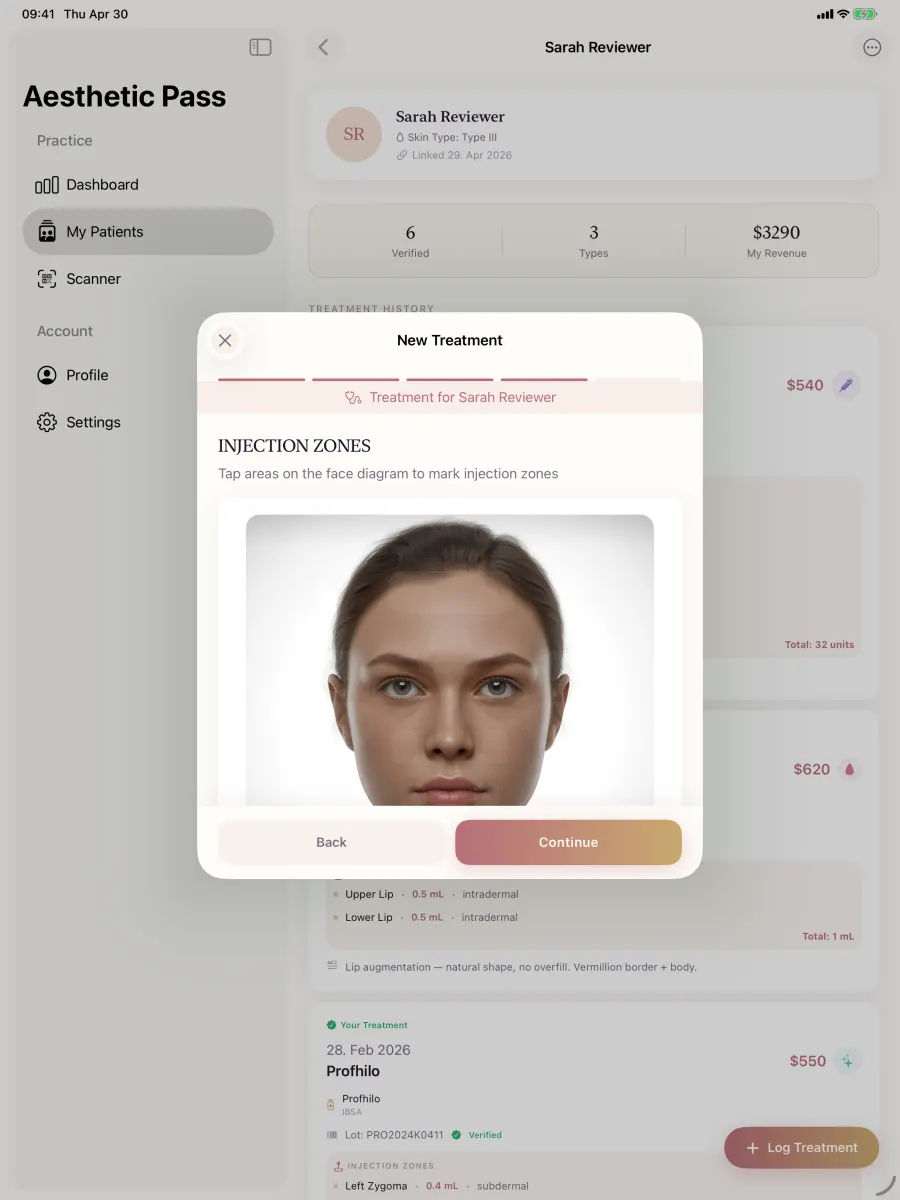
From guide to daily practice
Aesthetic Pass connects the complete documentation workflow
This guide is published by the team behind Aesthetic Pass. The platform brings together the work that is otherwise split across paper, spreadsheets, a camera roll and disconnected systems in one connected treatment history.
- Visit-specific anamnesis with patient and practitioner signatures
- Planned products and treatment areas in the visit context
- Structured treatment documentation
- Injection mapping with automatic totals
- Optional before-and-after photos
- Product and lot documentation
- Patient-owned, portable treatment history
- One professional account across web, iOS and Android
Register free on the web, download iOS or Android, and sign in with the same credentials. Starter includes up to 25 distinct treated patients; repeat treatments for the same person do not consume another quota position.
1. Start with the purpose of an aesthetic treatment record
A treatment record should let an authorised reader reconstruct the documented event without relying on the practitioner’s memory, a chat thread or an unlabelled image. The reader should be able to identify the patient and responsible practitioner, understand the treatment context, see the product and practitioner-entered lot information, inspect the areas and quantities that were recorded, distinguish original entries from later additions, and find deliberately linked attachments. A single free-text field can supplement this structure, but it should not carry every essential fact.
The record also supports continuity. A patient may change provider, receive more than one treatment type or return months later. A provider may need to understand which history came from another professional and which data the patient supplied. Preserving provenance matters as much as preserving values. Software should not flatten a patient statement, an automated calculation and a practitioner observation into one apparently equivalent line of text.
Documentation is not treatment guidance. A face diagram, list of zones or product catalogue helps organise what a qualified professional chooses to record. It must not be represented as recommending a dose, depth, technique, product or injection location. The practice defines required clinical content and review according to its professional role, services and jurisdiction. The software’s responsibility is to preserve the data and state it claims to preserve.
A practical test: can another authorised professional understand the documented event without guessing which values came from the patient, practitioner or software?
2. Use a record model that separates context, treatment detail and attachments
A durable model has layers. Patient and practitioner identities are persistent entities. The treatment is an event connected to both. Product selection and entered lot information describe treatment context. Zones or points preserve the practitioner’s location-specific entries. Photos are attachments with before or after roles. Follow-up entries refer back to the event rather than silently rewriting it. This structure makes correction, export and display more predictable than placing everything in a formatted paragraph.
Use stable internal identifiers and keep direct identifiers out of filenames and public URLs. A patient’s display name can change without breaking treatment relationships. A practitioner may leave a clinic without ceasing to be the author of a historical record. A product catalogue label can be corrected while the selected historical product context remains intelligible. Database relationships should reflect those distinctions rather than using email or visible text as the only link between records.
A record model should also preserve optionality honestly. Not every treatment needs photos. Not every procedure uses units, millilitres or the same mapping surface. The treatment type should determine which fields and diagram are relevant, while the common event still preserves patient, practitioner, date and review state. Adding a new category should not require pretending that it is toxin or reusing an anatomically inappropriate screen merely because one already exists.
| Layer | Examples | Why structure matters |
|---|---|---|
| Identity and responsibility | Patient, practitioner, professional context | Keeps authorship and subject clear when names, clinics or access change |
| Treatment event | Date, category, cost, summary, status | Provides one authoritative container for the documented visit |
| Product context | Selected product, practitioner-entered lot, unit type | Avoids hiding traceability context in free text |
| Location detail | Zone, side, marker, quantity, note | Preserves the source entries from which summaries are derived |
| Attachments | Before and after images with upload and link state | Prevents camera-roll files from becoming orphaned or misassigned |
| Later history | Follow-up, correction or added note with author and time | Keeps later information distinguishable from the original entry |
3. Make injection mapping a record, not a decorative face
An injection map is useful when every visual marker has a readable record behind it. A point should connect to a zone or anatomical label, side where relevant, practitioner-entered quantity, measurement unit and optional note. If the application shows a beautiful face but stores only screen coordinates, the meaning can be lost when the image changes or the record is exported. Store the semantic detail and use the image as a navigational and review surface.
Mapping interfaces should adapt to treatment category. Toxin, filler, biostimulator or skinbooster, mesotherapy, peeling, laser and fat-dissolving documentation do not necessarily use the same quantities, products or anatomical representation. A generic face can be a neutral recording aid, but the interface must not imply clinical equivalence. Long product lists need search, predictable alphabetical order and a clear route to continue after selection so the practitioner does not scroll through hundreds of options to find the next action.
Marker positions and labels require careful visual testing at multiple screen sizes and in right-to-left languages. They should remain associated with the intended region without claiming anatomical precision the image cannot support. When a public educational diagram is used, it needs an explicit boundary: the points are documentation references, not a plan for where to inject. In the clinical app, the practitioner’s own taps and entries create the record.
Select the correct treatment context
Choose the category and product before applying fields or surfaces that depend on that context.
Create semantic entries
Store zone, side, quantity, unit and notes behind each visual marker rather than relying on pixels alone.
Review map and table together
Let the practitioner compare the visual distribution with the readable source rows before saving.
Preserve neutral boundaries
State clearly that the interface records practitioner decisions and does not recommend treatment.
4. Derive totals from source entries instead of asking for estimates
A practitioner often does not know the final toxin total before completing the documented points or zones. Asking for a total on the first screen creates an estimate that must later be reconciled with the actual entries. If both values are independently editable, disagreement is inevitable. The cleaner model records quantities where the practitioner used them and calculates the total at review. The calculation is transparent: the source rows remain visible and the sum can be recomputed.
Calculation does not mean clinical recommendation. The software adds practitioner-entered numbers; it does not decide what those numbers should be. Measurement units remain attached to the selected product and treatment context. The interface should prevent summing incompatible units or unrelated products without an explicit model. If quantities are corrected after returning to an earlier step, the review total should update immediately and the saved event should use the final consistent state.
Tests should cover zero, decimals where the category permits them, large but syntactically valid entries, removed markers, duplicate zones, back navigation and restoration after process interruption. Decide whether blank means zero or incomplete and show that distinction. Do not let display rounding change the stored value. A calculated summary is reliable only when the input validation, unit context and update rules are explicit.
| Approach | Operational effect | Review risk |
|---|---|---|
| Total entered before mapping | Practitioner estimates, then records zones separately | Two values can disagree and one may be forgotten |
| Total entered after mapping | Practitioner manually repeats the arithmetic | Transcription and arithmetic errors remain possible |
| Total derived from source entries | Software sums the final documented rows | Input errors remain visible, but the arithmetic has one source of truth |
5. Record product and lot context without overstating verification
A treatment record should preserve the selected product in a recognisable form. Product names often remain in English across languages and should not be translated into invented equivalents. Catalogue grouping can improve selection, but it must distinguish fillers, biostimulators or skinboosters, mesotherapy products, peels and other categories according to the product model. Package quantities such as two syringes or a millilitre amount usually do not belong in the reusable product title when the practitioner records the amount used separately.
Lot information may be typed or scanned by the practitioner and stored with the treatment. That is useful traceability context, but storage is not the same as manufacturer authentication. The interface and marketing copy should not claim that an entered value proves authenticity, regulatory status or supply-chain integrity unless a specific external verification actually occurred. Preserve capture method and input where useful, and let the practitioner correct mistakes through an accountable process.
Catalogue maintenance deserves governance. Adding products from a distributor page requires determining whether each item is clinically relevant to the treatment category, removing pack-size suffixes without collapsing distinct product models, preventing duplicates and sorting labels consistently. Historical records should continue to display even if a product is later retired from new selection. Product-list changes are data changes, but treatment-category changes may also require mobile interface and mapping logic, which should be released and tested deliberately.
- Store the selected product or model separately from amount used and practitioner notes.
- Preserve recognised brand names across interface languages unless an official local form exists.
- Label lot values as entered or scanned information rather than independent certification.
- Retire catalogue choices without erasing the context of historical treatments.
- Test category, search, sorting and continuation on both mobile platforms after catalogue expansion.
6. Treat clinical photos as deliberate, stateful attachments
Before-and-after images are useful only when their relationship to patient, treatment, role and time is clear. A file in a camera roll is not yet a clinical attachment. The workflow should start the rear camera for a practitioner photographing the patient, allow deliberate selection, preserve the before or after role, compress efficiently and upload without freezing the interface. It should then link the returned hosted image reference to the intended treatment rather than assuming upload alone completed the job.
Every stage has a different state: selected, preparing, uploading, uploaded, linked, failed or removed before save. Disappearing images often result from treating a local URI as permanent, navigating away before an upload completes, overwriting state when multiple images finish out of order, or saving the treatment before attachment references are ready. The interface should show progress, prevent accidental duplicate actions and retain enough state for an explicit retry. It should never display a failed image as saved.
Optionality matters. A valid treatment record may have no photos, one to three before photos, one or two after photos, or a combination within the supported limits. Test JPEG, HEIF and common gallery sources, large files, slow connections, app backgrounding and returning to previous steps. Verify the final hosted images and database links against the correct patient and treatment using test data. Performance comes from compression and concurrent work, not from pretending an upload succeeded before it did.
Capture or select
Use the intended camera and confirm that the image belongs to the active patient and visit.
Prepare efficiently
Normalise orientation and compress off the main thread while preserving clinically useful quality.
Upload with visible state
Allow safe concurrency, show each slot independently and retain failures for deliberate retry.
Link and verify
Save hosted references with the treatment, then reopen the patient history and compare the expected image count and order.
7. Make review, save and recovery impossible to misunderstand
The review screen should be a reconciliation point, not a decorative summary. Show the patient context, treatment type, date, cost where used, selected product, entered lot information, zones, quantities, derived totals, notes and attachment state. Validate required fields against the same state shown to the user. An intermittent “treatment type required” error after the user selected a type is a state-management failure, not a user mistake; navigation and process recreation must preserve one authoritative selection.
Saving a treatment is a transaction from the user’s perspective even if the backend uses several operations. Decide what happens if the treatment row succeeds but one photo link fails, or if the network response is lost after the server committed the record. Use stable operation identifiers or server reconciliation to avoid creating a second treatment when the practitioner retries. Keep the button disabled only while the active request is genuinely in progress and provide an actionable message if intervention is needed.
Back navigation deserves equal attention. Practitioners should be able to correct a product or zone and return without losing unrelated images or totals. Process death and backgrounding should lead to a known outcome, especially on Android. Automated tests can validate pure calculations and state transitions, while simulator and emulator flows expose navigation and layout issues. A real-device test remains necessary for cameras, photo pickers, memory pressure and variable mobile networks before a risky release.
| Check | Evidence of success | Failure signal |
|---|---|---|
| Required state | Displayed selection and validation use the same value | A selected treatment becomes “required” after navigation |
| Calculated summary | Total always equals visible source entries | Stale total after editing or removing a zone |
| Attachments | Each expected hosted reference is linked once | Image disappears, duplicates or belongs to another treatment |
| Repeated save | One treatment event is created | Second row after timeout or repeated tap |
| Reopen | Saved record renders from patient history | Success toast without a retrievable event |
8. Build a longitudinal history rather than isolated visit files
A treatment passport becomes valuable when events remain connected over time. The patient can see an ordered history, while an authorised provider can understand previous products, zones, dates and follow-up context within the permissions of the relationship. The event should remain attributable to its original practitioner even if the patient later links to another provider. Unlinking a relationship should remove ongoing access where appropriate, not rewrite the historical authorship or erase a verified treatment.
A patient or practitioner should not casually delete a verified treatment merely because it is inconvenient. Clinical and legal requirements vary, so correction and retention need a defined policy. A common design is to preserve the original event, attach accountable corrections or status changes, and limit destructive operations to authorised processes. The user interface should not promise immutability in a technical sense unless the backend enforces it, but it should reflect the principle that treatment history is not a disposable social-media post.
Portability also requires understandable exports and shared views. A screenshot of a timeline may be readable but not structured. A raw database export may be complete but unusable. Decide which audience the export serves and preserve context, units, authorship, timestamps and attachment references appropriately. Secure QR access can support time-bounded sharing, but the token must be validated server-side and access logged according to the product design rather than encoded as an open patient identifier.
- Keep historical practitioner attribution when current clinic relationships change.
- Use accountable corrections instead of silent overwrites where the record requires history.
- Separate unlinking current access from deleting a treatment event.
- Design exports for a defined authorised reader and include semantic context.
- Validate shared-access tokens on the server and avoid exposing patient identifiers in URLs.
9. Govern the workflow and evaluate products honestly
Professional record guidance emphasises clarity, accuracy, timeliness and security. The UK General Medical Council describes expectations for formal records, while the Care Quality Commission’s Regulation 17 guidance refers to secure, accurate, complete and contemporaneous records for regulated providers. These sources illustrate operational qualities; they do not form a universal checklist for every profession or country. The practice must map applicable requirements to its own services and obtain local professional or legal review where needed.
Governance assigns owners. Name who controls the product catalogue, who reviews access, who handles corrections, who monitors failed uploads and who validates a release before practitioners depend on it. Review incidents and a small sample of records periodically. Avoid collecting metrics that expose patient data to marketing tools. Monitor aggregate workflow failures, completion and support demand instead. A reliable system is not one with no reported errors; it is one that detects meaningful errors and provides a controlled response.
When comparing software, test the connected work it enables. Aesthetic Pass brings mobile patient-provider connection, structured treatment documentation, patient-held continuity, a public booking page, services, availability, Google Calendar and performance reporting into one focused journey. The qualified professional remains the source of clinical assessment and decisions, while the software makes the documented and operational context easier to review.
Define the authoritative record
Identify which system and event represents the final saved treatment and how attachments and corrections relate to it.
Assign operational owners
Name responsibility for catalogue, access, incidents, training, retention and release approval.
Test realistic scenarios
Use multiple treatment types, photo combinations, platforms, languages, edits, interruptions and slow networks.
Review evidence after launch
Monitor errors, support cases and record samples without sending clinical content to marketing analytics.
Revalidate after change
A new category, camera flow, authentication rule or backend policy deserves targeted regression testing.
10. The connected treatment record in Aesthetic Pass
In Aesthetic Pass, a professional uses a shared web and mobile account, links to a patient through the supported workflow and documents the event in the mobile app. Treatment categories determine relevant product selection and mapping. Search supports long filler, mesotherapy and biostimulator or skinbooster lists. The practitioner records zones and values; toxin totals are calculated from the final documented entries. The rear camera opens by default for clinical photos, and photos remain optional within the supported before-and-after limits.
The saved event appears in the patient’s treatment history with its practitioner and product context. Product and lot values are documentation, not authenticity certification. Patient follow-up milestones can be shown across treatment categories, while reminder policy should remain proportionate and opt-in rather than producing engagement for its own sake. The platform’s value comes from a connected, portable record, not from forcing patients to open the app repeatedly.
Professionals can start free with up to 25 distinct treated patients. The count is based on distinct patients with treatment history rather than repeated scans of the same person, so routine follow-up does not consume multiple places and unlinking does not create a simple quota bypass. Pro supports unlimited use under the current offer. Before live adoption, create an account, download iOS or Android, sign in with the same credentials and test the complete path with fictional data.
Aesthetic Pass records what the qualified professional enters. It does not decide whether, where or how a patient should be treated.
Scope boundaries
Important boundaries for treatment records
- This guide describes record architecture and operations; it is not medical advice, legal advice, a treatment protocol or a complete jurisdiction-specific documentation standard.
- Maps, product lists and calculations organise practitioner-entered documentation and do not recommend products, quantities, techniques, depths or treatment locations.
- Aesthetic Pass combines focused web booking, performance reporting, treatment documentation and a patient passport so the operational and clinical journey remains connected.
FAQ
Questions about aesthetic treatment records
What should an aesthetic treatment record include?
The exact required content depends on the practice and jurisdiction, but a useful structured event commonly preserves patient and practitioner context, date, treatment, selected product, entered lot information, location-specific details, quantities and units, notes, attachment state, review status and accountable later additions.
Why calculate toxin totals from zones?
The zones or points are the source entries. Deriving the total from them avoids maintaining an independent estimated total that can disagree with the documented detail. The calculation does not recommend a dose.
Are before-and-after photos mandatory?
No. A no-photo path should remain valid. When images are used, each should be deliberately associated with the correct patient, treatment, before-or-after role and confirmed upload state.
Does recording a lot number verify the product?
No. It preserves practitioner-entered or scanned context. Independent manufacturer or regulatory verification is a different function and should not be implied unless it actually occurred.
How do booking and the aesthetic treatment record work together?
Aesthetic Pass connects focused web booking for services, availability, request management and Google Calendar with mobile clinical documentation and a patient-held treatment passport. Booking analytics adds conversion and appointment outcomes to the same professional operating picture.
How should a clinic test treatment-record software?
Use fictional cases covering every relevant treatment category, no photos and all supported photo combinations, long product lists, edits, back navigation, interrupted uploads, repeated save attempts, iOS and Android, and reopening the final record from the correct patient history.
Official reference points
General Medical Council: Good medical practice, Domain 3
Current UK professional guidance used for the record qualities of clarity, accuracy, contemporaneity and security.
Open source: General Medical Council: Good medical practice, Domain 3Care Quality Commission: Regulation 17 guidance
Official English guidance referring to secure, accurate, complete and contemporaneous records for regulated providers.
Open source: Care Quality Commission: Regulation 17 guidanceRegulation (EU) 2016/679 (GDPR)
Official EU text used for data-design principles including purpose limitation, minimisation, accuracy, storage limitation, integrity and confidentiality.
Open source: Regulation (EU) 2016/679 (GDPR)Move beyond fragmented charting
Test a connected treatment record in Aesthetic Pass
Create a free professional account, download iOS or Android and document a fictional case with zones, automatic totals, product context and optional images before live adoption.
Discuss your workflow