SOP template
Build a treatment documentation SOP your team can follow
A useful SOP is short enough to use during a busy clinic day and precise enough to answer who does what when the normal workflow fails. This template provides an operating structure that each clinic can adapt to its services and obligations.
- Who it is for
- Clinic managers, clinical leads and implementation owners
- Reading time
- 11 minute guide
- Clinical reviewer
- Dr. Adi Zoabi, MD
- Updated
Disclosure: drylabs GmbH publishes this resource and sells Aesthetic Pass. Review roles, evidence standards and corrections are documented in our editorial policy. Read the policy.
Executive summary
The SOP needs owners, states and exceptions
- Assign one accountable owner for the procedure and named owners for training and incident escalation.
- Define the minimum reviewable record without making optional photos a hidden blocker.
- Document recovery for interrupted uploads, failed saves, wrong-patient selection and duplicate actions.
- Audit a small sample and update the procedure from evidence instead of adding controls after every anecdote.
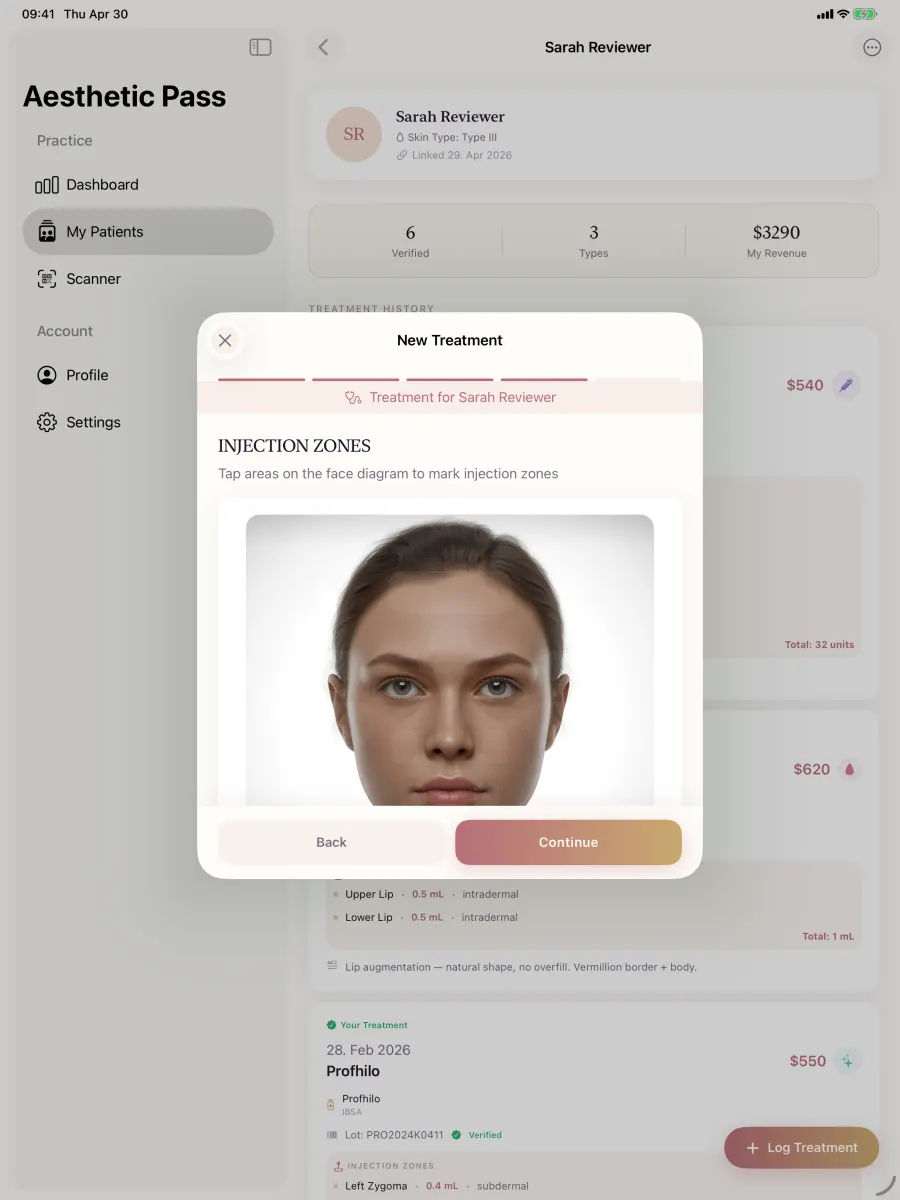
From guide to daily practice
Aesthetic Pass connects the complete documentation workflow
This guide is published by the team behind Aesthetic Pass. The platform brings together the work that is otherwise split across paper, spreadsheets, a camera roll and disconnected systems in one connected treatment history.
- Visit-specific anamnesis with patient and practitioner signatures
- Planned products and treatment areas in the visit context
- Structured treatment documentation
- Injection mapping with automatic totals
- Optional before-and-after photos
- Product and lot documentation
- Patient-owned, portable treatment history
- One professional account across web, iOS and Android
Register free on the web, download iOS or Android, and sign in with the same credentials. Starter includes up to 25 distinct treated patients; repeat treatments for the same person do not consume another quota position.
1. Purpose, scope and roles
Start the SOP with one sentence describing its purpose: to create a consistent, reviewable treatment record and a predictable response to documentation exceptions. Name the locations, treatment types, staff roles and systems that are in scope. Anything outside that scope needs a separate decision rather than silent improvisation.
Separate accountability from execution. The clinical lead may own the procedure, a practitioner creates the treatment record, a clinic administrator manages team access and a designated support contact coordinates technical incidents. One person can hold several roles in a small practice, but the responsibilities should still be explicit.
- Procedure owner: approves the SOP and reviews changes.
- Treating practitioner: confirms patient context and reviews the completed treatment record.
- Clinic administrator: manages staff access and clinic configuration.
- Training owner: onboards staff and records completion of scenario-based training.
- Incident owner: records workflow-blocking exceptions and coordinates escalation without copying patient data into informal channels.
2. Standard treatment documentation flow
Write the standard flow as observable actions. Avoid instructions such as 'complete documentation correctly'. A new team member should be able to follow the sequence and know when a record is ready for review.
Establish visit context
Confirm patient, practitioner, clinic, treatment date and the practice's current anamnesis and consent status.
Select treatment and product
Choose the intended treatment type and product; enter or scan lot information when relevant and review the value shown.
Document treatment detail
Record the selected areas, points and entered values. For toxin workflows, let the final total derive from the documented zone entries.
Handle optional images
Proceed with no photos when appropriate, or select up to the supported limits and confirm each image belongs to this patient and treatment.
Review, save and verify
Review the summary, save once, wait for a clear result and open the treatment from the correct patient's history.
3. Exception and recovery table
The exception section is what turns a checklist into an operating procedure. Define the immediate safe action, what information may be recorded, who is notified and how the team confirms recovery. Never tell staff to work around a blocked screen by creating duplicate patient or treatment records.
Wrong patient or treatment context
Stop before saving. Return to the context step, select the correct record and verify that later values still correspond to the intended treatment.
Image upload pending or failed
Do not describe the image as stored. Keep the treatment context, retry through the supported control and verify the final image count after success.
Network interruption
Preserve local work where the product supports it, avoid repeated submissions and resume only when the interface displays a known state.
Save result unclear
Check the patient's history before tapping save again. If the state remains unclear, capture non-sensitive diagnostic context and escalate through the approved support path.
Access or device issue
Use the clinic's approved continuity process. Do not share accounts, export records to personal messaging apps or leave an unlocked patient screen unattended.
4. Training, quality review and change control
Train with scenarios, not a slide deck alone. Every practitioner should complete a routine record, a no-photo record, a multi-photo record, a back-navigation change and a simulated upload interruption before using the workflow independently.
Review a small sample after launch and at an agreed cadence. Record patterns rather than blame: missing context may indicate confusing UI, inconsistent training or an SOP that does not match the real clinic day. Update the procedure with an owner, effective date and short change note.
- Define the sample size and cadence according to clinic volume and risk.
- Track workflow exceptions without putting patient names or treatment details in the improvement log.
- Review staff access on role change and at a scheduled interval.
- Retest critical scenarios after material product or process changes.
- Keep previous SOP versions according to the clinic's document-control approach.
Pilot target: the team should be able to explain the normal path, the no-photo path and the failed-upload path without inventing an unofficial workaround.
Scope boundaries
Template boundaries
- This is a starting structure, not a clinic-specific medical, legal, regulatory or quality-management procedure.
- It does not define consent wording, treatment suitability, dose, injection technique or mandatory retention periods.
- The clinic must approve the final SOP and align it with its services, contracts, policies and applicable obligations.
FAQ
SOP questions
How long should the SOP be?
Long enough to define scope, owners, the standard flow, exceptions, training and review. Put detailed legal or clinical policies in controlled references rather than hiding the daily workflow inside a very long document.
Who should own the SOP?
A person with authority over the clinic's treatment-documentation process. Technical support can contribute, but the clinic should own how the system is used in practice.
Should photos be mandatory in the SOP?
Only if the clinic has a justified, approved requirement for a particular workflow. Aesthetic Pass itself supports completion without photos.
What should an incident log contain?
Date, system area, non-sensitive description, impact, immediate action, owner and outcome. Avoid copying patient names, images or treatment detail into a general improvement tracker.
Authoritative reference
Regulation (EU) 2016/679 (GDPR), Article 5
Official source for the data-minimisation, accuracy, storage-limitation and integrity/confidentiality principles referenced by the template.
Open source: Regulation (EU) 2016/679 (GDPR), Article 5Validate the procedure
Test the SOP against the current product
Start free directly, or use an optional product walkthrough to run the normal path and one exception path with your implementation owner. We will document product boundaries clearly before you decide on a pilot.
Discuss your workflow