Workflow comparison
Aesthetic Pass vs paper, spreadsheets and shared folders
Paper and spreadsheets can be workable tools. The question is where they create manual reconciliation, unclear ownership or fragmented photos as a practice grows—and whether a structured system removes enough of that work to justify change.
- Who it is for
- Practitioners and clinics considering a move from manual records
- Reading time
- 9 minute guide
- Clinical reviewer
- Dr. Adi Zoabi, MD
- Updated
Disclosure: drylabs GmbH publishes this resource and sells Aesthetic Pass. Review roles, evidence standards and corrections are documented in our editorial policy. Read the policy.
Executive summary
Compare the operating model, not the format
- Manual tools are flexible but depend heavily on local naming, filing and access discipline.
- Structured workflows can reduce duplicate entry and make treatment context easier to review.
- A migration is only successful when the team can complete the real workflow reliably.
- Historical records should remain readable; a new system should not require a risky all-at-once migration.
From guide to daily practice
Aesthetic Pass connects the complete documentation workflow
This guide is published by the team behind Aesthetic Pass. The platform brings together the work that is otherwise split across paper, spreadsheets, a camera roll and disconnected systems in one connected treatment history.
- Visit-specific anamnesis with patient and practitioner signatures
- Planned products and treatment areas in the visit context
- Structured treatment documentation
- Injection mapping with automatic totals
- Optional before-and-after photos
- Product and lot documentation
- Patient-owned, portable treatment history
- One professional account across web, iOS and Android
Register free on the web, download iOS or Android, and sign in with the same credentials. Starter includes up to 25 distinct treated patients; repeat treatments for the same person do not consume another quota position.
1. What each approach does well
Paper is immediate, familiar and independent of a network connection. A well-run paper process with controlled storage and clear indexing may be appropriate for some practices. Spreadsheets add search, sorting and shared calculation, while a carefully managed folder can organise images and scanned documents.
The trade-off is that these tools do not inherently understand an aesthetic treatment. The clinic designs and enforces the relationship between patient, practitioner, product, lot, treatment zone, units, images and follow-up. That flexibility can become repeated administrative work as volume and team size grow.
- Paper: simple capture, physical handling and a locally defined filing process.
- Spreadsheet: flexible columns and calculations, but schema and permissions require active maintenance.
- Shared folder: familiar image storage, but treatment linkage depends on naming and access conventions.
- Structured platform: purpose-built relationships and workflows, with less freedom to invent a local format.
2. Questions for a side-by-side workflow test
Choose five recent, anonymised scenarios and answer the same questions for the current process and the proposed platform. Do not score from a sales presentation. Perform the steps with the people who will use the system during a normal clinic day.
Find the complete context
How many places must someone open to understand the date, treatment, product, entered lot information, zones, units and images?
Correct an error
Can an authorised practitioner correct a wrong value without obscuring which patient or treatment the change belongs to?
Add and review photos
Can the team confirm that every selected image reached the intended treatment and that failed uploads remain visible?
Change team access
How quickly can the clinic add, change or remove access when staff roles change?
Continue during disruption
What happens when the network, device, printer, shared drive or account is unavailable?
3. Where Aesthetic Pass changes the workflow
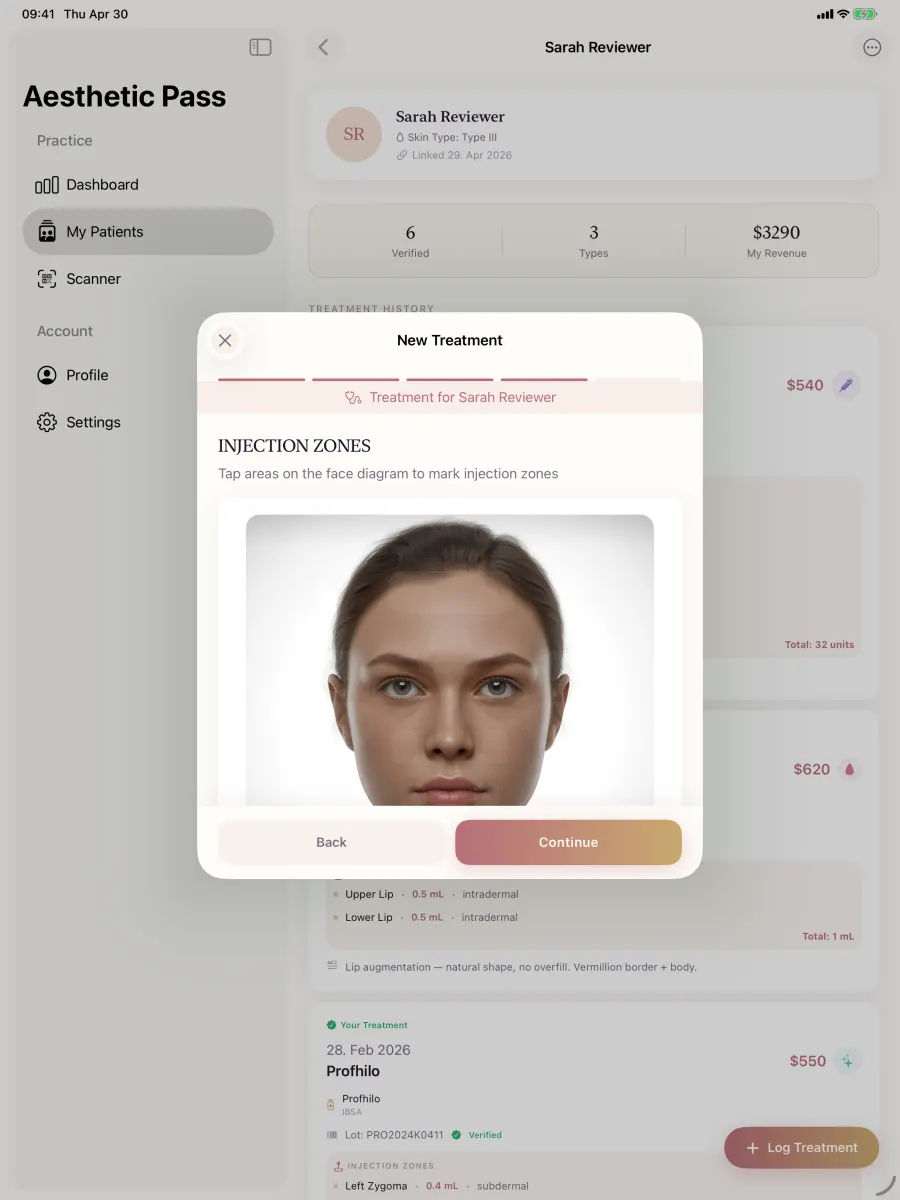
Aesthetic Pass is designed around a connected provider-patient treatment record. The practitioner selects a patient and treatment, records product and practitioner-entered lot information, documents treatment areas and values, optionally uploads treatment-linked images and reviews the result before saving.
For toxin treatments, the final unit total is calculated from the documented zone values. The current image workflow supports no photos, up to three before photos and up to two after photos. Patients can view their timeline and can create a reusable 24-hour bearer link when they intentionally share available passport information.
- Structured fields reduce reliance on filename and column conventions.
- A single treatment context can connect product, zones, values and optional photos.
- Platform controls do not remove the need for practitioner review or clinic procedures.
- A bearer link should be treated like a temporary key and shared only with the intended recipient.
4. Run a controlled migration pilot
Avoid an all-at-once change. Select a small authorised team, a defined set of treatment types and a short prospective period. Keep the existing record process available according to the clinic's continuity plan while the team validates the new workflow.
Measure completion, correction, failed-upload recovery and time to find a past record. Interview practitioners about the exact step that caused friction. At the end, decide whether to proceed, adjust the SOP or stop. A pilot that identifies a poor fit is still useful evidence.
Define scope
Name the team, treatment types, dates, devices and success criteria before the first pilot record.
Train on exceptions
Include no-photo completion, back-navigation, slow upload and duplicate-tap prevention—not only the happy path.
Review a sample
Check that records open under the correct patient and that expected values and images are present.
Make an evidence-based decision
Compare observed outcomes with the agreed scorecard rather than relying on novelty or sunk effort.
Scope boundaries
Comparison boundaries
- This page does not claim that paper or spreadsheets are automatically unsafe, unlawful or unsuitable.
- It compares workflow characteristics, not the regulatory status of a particular clinic or system.
- Aesthetic Pass feature and pricing details should be confirmed on the current product, security and pricing pages.
FAQ
Migration questions
Do we need to digitise every historical record first?
No. Many practices can pilot a prospective workflow while maintaining authorised access to historical records under the existing procedure. The right approach depends on operational and legal requirements.
What should we measure during a pilot?
Completion rate, time to document, correction frequency, upload recovery, record retrieval and practitioner-reported blockers are more useful than the number of features opened.
Can we still complete a treatment without photos?
Yes. Photos are optional in the Aesthetic Pass treatment workflow.
What is the biggest migration risk?
Changing the tool without defining ownership, training, exception handling and historical access. Treat implementation as an operating change, not only a software installation.
Test before migrating
Bring your current workflow to a focused demo
We will compare the same treatment path step by step, including one exception selected by your team. No bulk migration or paid commitment is required to evaluate the fit.
Discuss your workflow