Record template
Aesthetic injector patient record template
Use this field map to compare your current paper, spreadsheet or software record with the information your team needs during an aesthetic treatment. The download is a blank CSV schema with no patient data and is intended for workflow design—not as a completed medical record.
- Who it is for
- Independent injectors, clinic operations leads and implementation owners
- Reading time
- 9 minute guide
- Clinical reviewer
- Dr. Adi Zoabi, MD
- Updated
Disclosure: drylabs GmbH publishes this resource and sells Aesthetic Pass. Review roles, evidence standards and corrections are documented in our editorial policy. Read the policy.
Download the blank patient-record field templateCSV · blank schema · English
Executive summary
A useful template connects context, detail and verification
- Separate patient and visit context from the treatment detail entered during the procedure.
- Record the selected product, entered lot information, zones and point values in fields that can be reviewed later.
- Treat images as optional linked assets with an explicit upload state—not as filenames pasted into a note.
- End with a practitioner review and a clear saved outcome rather than assuming a button tap completed the record.
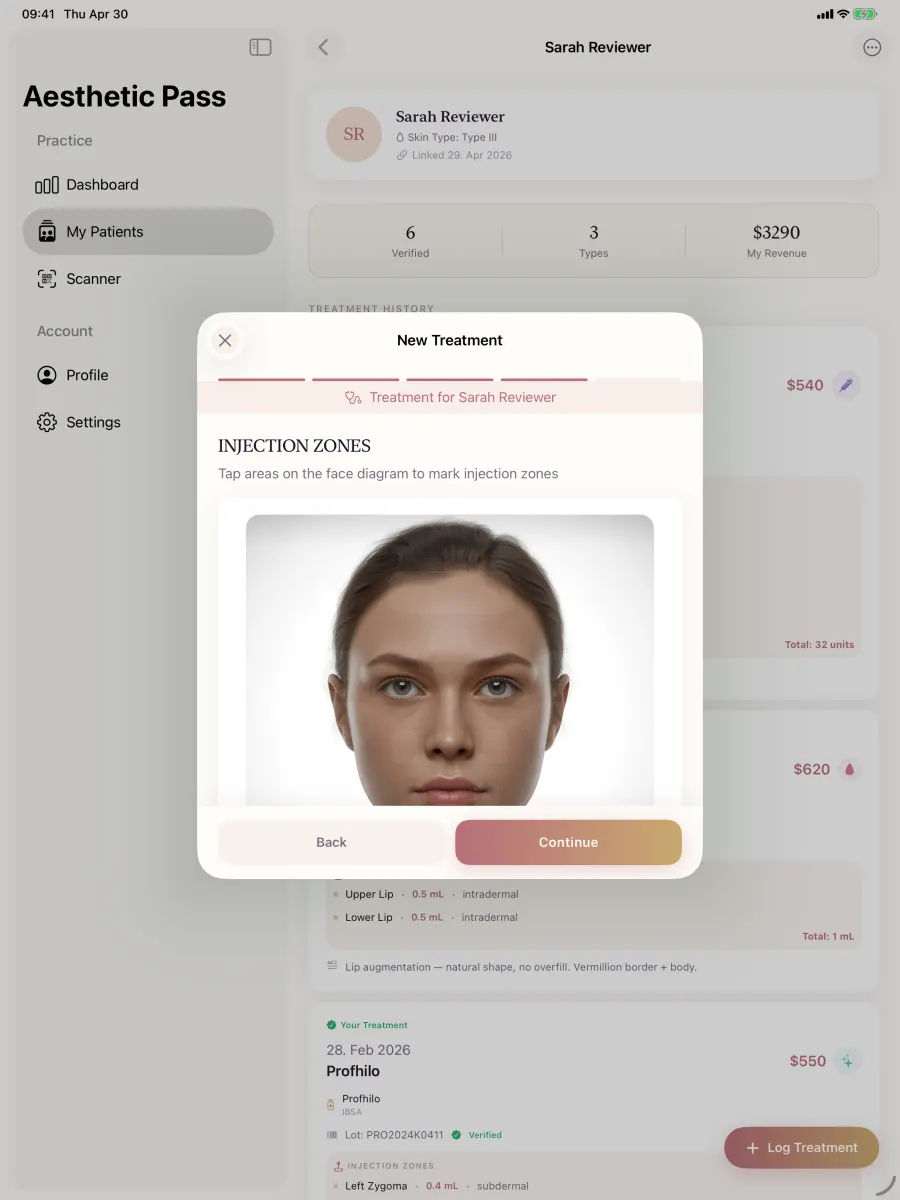
From guide to daily practice
Aesthetic Pass connects the complete documentation workflow
This guide is published by the team behind Aesthetic Pass. The platform brings together the work that is otherwise split across paper, spreadsheets, a camera roll and disconnected systems in one connected treatment history.
- Visit-specific anamnesis with patient and practitioner signatures
- Planned products and treatment areas in the visit context
- Structured treatment documentation
- Injection mapping with automatic totals
- Optional before-and-after photos
- Product and lot documentation
- Patient-owned, portable treatment history
- One professional account across web, iOS and Android
Register free on the web, download iOS or Android, and sign in with the same credentials. Starter includes up to 25 distinct treated patients; repeat treatments for the same person do not consume another quota position.
1. Structure the record before choosing fields
Start with the relationships the record must preserve: one authenticated practitioner, one patient, one visit and one treatment record. A spreadsheet may put everything in a single row, while a clinical platform may store related records separately. The structure matters because a patient can return for several treatments and a treatment can contain several zones, products or images.
The downloadable template groups columns by purpose. It deliberately uses placeholders such as internal_patient_reference rather than asking for names, email addresses or image files. Test the schema with fictitious data first. Do not upload live patient data into an uncontrolled spreadsheet merely because the template is available.
- Identify the practitioner and visit without duplicating credentials in free text.
- Use a stable internal patient reference appropriate to the authorised system.
- Keep treatment date and treatment type explicit.
- Define which fields your practice requires and which remain optional.
- Document who owns the template and when its field definitions were last reviewed.
2. Map the treatment detail
Aesthetic treatment documentation becomes difficult to audit when the product is in one note, the lot number on a photograph and the injection detail in a separate diagram. The field map keeps these concepts distinct so a reviewer can determine what was selected, what was entered and how the final summary was produced.
For toxin treatments, capture point or zone values as the source detail and derive the final total from them. A second manually typed total can disagree with the underlying entries. For other procedures, keep the quantity and unit explicit rather than assuming every product is measured the same way.
- Selected treatment type and product name.
- Manufacturer or product family when relevant to the local workflow.
- Practitioner-entered lot or batch value and its capture method.
- Treatment zone, side, point reference, quantity and unit.
- Calculated total, calculation basis and practitioner review state.
The template stores observations and practitioner entries. It does not authenticate a product or recommend a dose, product, point or treatment area.
3. Represent optional photos and exceptions honestly
A photo field should not imply that an image exists before the upload succeeds. Record the intended slot, whether it is before or after, the capture or selection time, upload state and the system reference returned after storage. Keep patient names and email addresses out of filenames and public URLs.
Use the template to test the edge cases your workflow must survive: no photos, one to three before images, one or two after images, a retry after network interruption and a return to an earlier step. A failed image should remain visibly failed or pending until a deliberate retry succeeds; the treatment should not claim that all expected assets are stored.
Select deliberately
Confirm that each image belongs to the active patient and treatment before upload.
Track the state
Distinguish selected, compressing, uploading, stored and failed states.
Retry once from known state
Reuse the intended slot rather than silently creating a duplicate attachment.
Verify linkage
Open the saved treatment and confirm the expected image count and order.
4. Add review, access and retention decisions
A field map is not a clinic policy. The practice must decide who can create, review, correct, export and delete each type of record; which changes need an audit trail; and which retention rules apply. These decisions vary by jurisdiction, service, professional role and contractual context.
Before adopting the template, run one normal fictional case and one exception case with the people who actually document treatments. Remove fields that have no defined purpose, add missing context, and record the final owner and review date. If the schema is imported into another system, confirm access control and deletion behaviour before using real data.
- Name the record owner and clinical reviewer role.
- Define correction and late-entry handling.
- Document access removal when a practitioner leaves.
- Set retention and deletion rules after qualified review.
- Re-test the template whenever the treatment workflow materially changes.
Scope boundaries
Template boundaries
- The CSV is a field-design aid, not a medical record, consent form, legal checklist or clinical protocol.
- It must not be populated with live personal data unless the chosen storage and workflow have been authorised and assessed.
- Each practice remains responsible for required content, access, accuracy, retention and professional review.
FAQ
Patient-record template questions
Can I use the CSV as my production patient database?
It is not designed or offered as a production database. Use it to map fields and evaluate an authorised record system.
Should patient names appear in image filenames?
No. Avoid names, emails and other direct identifiers in filenames or public URLs; use the authorised system's internal linkage.
How should toxin totals be represented?
Keep the documented zone or point values as source detail and derive the final total from them for practitioner review.
Are clinical photos mandatory?
No. The template and Aesthetic Pass support a valid no-photo path. The practice decides when images are appropriate.
Authoritative reference
Regulation (EU) 2016/679 (GDPR), Article 5
Official source for purpose limitation, data minimisation, accuracy, storage limitation and integrity/confidentiality principles referenced in the governance section.
Open source: Regulation (EU) 2016/679 (GDPR), Article 5Test the record in context
Compare the template with a live documentation workflow
Start free directly, or bring a fictional or fully anonymised scenario to an optional product walkthrough. We will map each field to the current product and identify what remains a practice responsibility.
Discuss your workflow